QNAP storage pool or volume not active: what to check first
Original: nasutils.net/qnap-pool-not-active.html. Version of 2026-11-26.
Read-only checks over SSH show which layer stopped the pool: the disks and the RAID, LVM, the thin pool's metadata, or the volume's filesystem.
Topic: Pools, RAID and drives
The Linux layer between RAID and filesystem; on QTS it makes pools and volumes.volume, wolumin
A part of a pool, or of a RAID, with a filesystem, where shared folders are.
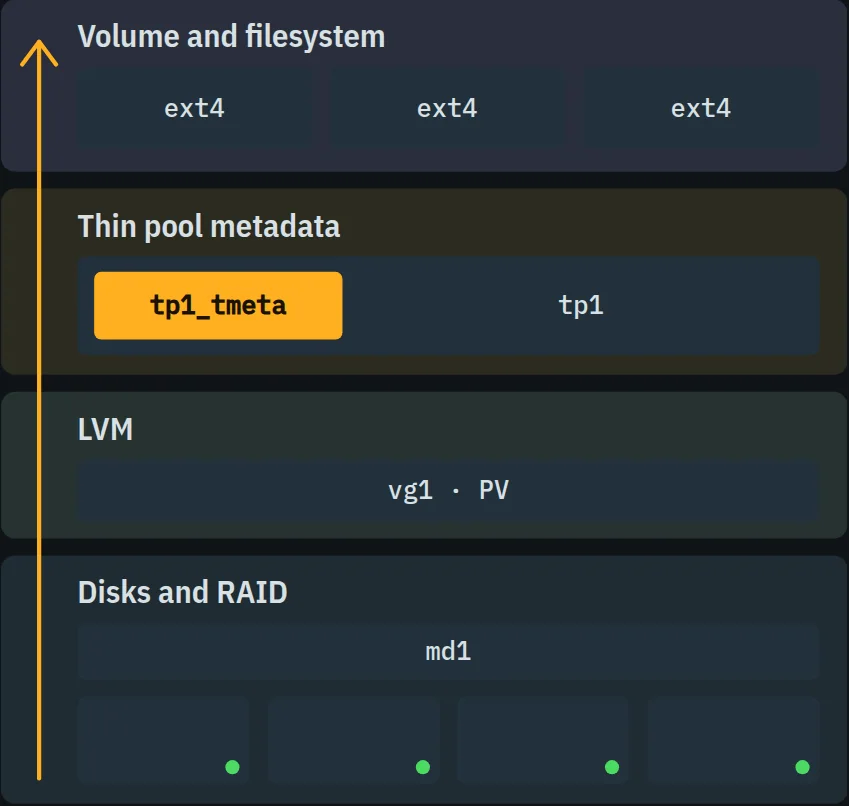
On a QNAP NAS with QTS, storage is built in layers. The disks form a RAID array, LVM puts a thin pool on the array, and the volumes live in the pool. A pool or a volume stops when one of these layers fails.
Check the layers from the disks up, in the order below. Each step gives the commands, what their output means and which layer it points to. None of the commands changes the RAID, LVM or the pool.
QTS with an LVM thin pool · commands over SSH, as admin · checked against LVM Pool Repair 1.8
Before you change anything
- Change nothing until you know which layer failed. Do not pull or swap disks, and do not start a repair in QTS or over SSH before you have read the checks below.
- Storage repair can be irreversible. Before anything writes to the pool, make sure your important data has a backup.
- Keep logs and copies off the pool you check: on an external disk or on a volume of another pool.
- No check and no repair can promise your data back. A repair of damaged mapping ranges cannot restore the data that was in them.
- QuTS hero
QNAP's NAS system on ZFS.ZFS
The storage system of QuTS hero: pool, filesystem and checksums in one.This page is for QTS with an LVM thin pool. QuTS hero uses ZFS, and these checks and LVM Pool Repair do not apply to it.
Four layers, from the disks up
A layer works only when the layer under it works. So the checks start at the disks. LVM Pool Repair follows the same rule: it repairs storage from the bottom up and stops when a lower layer is at fault.
Disks and RAID
QTS joins partitions of the disks into md RAID arrays. A data pool sits on such an array, for example md1.
LVM
LVM uses each array, or a DRBD device on it, as a physical volume (PV). The PVs of a pool form a volume group (VG), for example vg1.
Thin pool metadata
The thin pool, for example tp1, keeps its metadata on a device of its own, tp1_tmeta. The metadata maps every block of every volume in the pool.
Volume and filesystem
A volume that takes space from the pool only as data is written.ext4
The Linux filesystem of QTS data volumes.
Each volume is a thin volume in the pool with an ext4 filesystem. QTS mounts it, and the shared folders live on it.
Check in this order
Log in to the NAS over SSH as admin. Run the commands of a step and read the output. Go to the next step only when the layer looks right.
Read the kernel log
The record of events that the Linux kernel writes.
The kernel log shows disk errors and the messages of the pool's device-mapper devices.
dmesg | grep -iE 'device-mapper|thin|I/O error' | tail -n 12I/O errors of the disks under the pool point to a disk. Test the disk before you look at the layers above it.
Check the RAID
/proc/mdstat lists each md array with its state and its members. md_checker lists the data arrays with the state of each disk.
cat /proc/mdstat
md_checkerThe state of a RAID that works without one or more of its drives.
An array marked inactive means a RAID problem. In [4/3] one of 4 members is missing, and the array runs degraded. recovery, resync, reshape or check means that the array is busy.
Check LVM
pvs lists the physical volumes, vgs the volume groups, and lvs -a the pool and its volumes.
pvs
vgs
lvs -aIn pvs, an m in the third place of Attr (a-m) means that LVM has marked the physical volume as missing. A PV shown as unknown device does not exist on the system. If lvs -a shows no thin pool at all, the fault is below the metadata, in the RAID or in LVM.
Read the pool's row in lvs -a
The pool's Attr starts with t. Its ninth character is the health that LVM reports:
Mthe metadata is read-onlyFthe pool has failedDthe pool is out of data spaceppartial: a physical volume of the pool is missing
A volume's Attr starts with V. An a in its fifth place means active.
The part of Linux that manages the hardware, memory and processes.
If LVM or the kernel log printed one of these messages, the message names the layer:
Refusing activation of partial LVa physical volume is missing: the LVM layertransaction_idLVM's record of the pool does not match the pool's metadata: the LVM configurationCheck of thin pool … failedthe pool's metadatatoo small for targetthe RAID array is smaller than the volumes on it: the RAID layer
Diagnose the metadata with the pool offline
Only thin_check on the offline pool gives the diagnosis of the metadata. Taking the pool offline is a change, so it is a step of LVM Pool Repair: step 2 takes the pool offline, and step 1 runs the check. On a pool that is still active, step 1 offers a preliminary read-only check.
$ pdata_tools_8192 thin_check /dev/mapper/vg1-tp1_tmeta
examining superblock
examining superblock backups
  99 valid superblock backups, last backup_id=98 blocknr=8388509
examining devices tree
examining mapping tree
  thin device 9 is missing mappings [1470, 1725]
    bad checksum in btree node (block 21996)
  thin device 9 is missing mappings [3285, 3540]
    bad checksum in btree node (block 22007)
  thin device 9 has unexpected number of mapped blocks
    expected 5730 != actual 5220
examining clone tree
examining tiering tree
examining tiering space maps
-> exit code 1 (in: do_diag > thin_check_run)Check the filesystem of a volume that does not mount
The structure that keeps files and folders on a volume.
If the pool and its volumes are active in lvs -a, but a volume still does not mount, look at its filesystem.
dmesg | grep -iE 'EXT4-fs (error|warning)'Errors of EXT4-fs point to the filesystem of a volume. Check File System in QTS checks and repairs it. Start it only after you have read the checks above.
What a finding means
Each card names what you see, the layer it points to and what LVM Pool Repair 1.8 does in that case.
Disks and RAID
The script does not start a repair. It says to repair the RAID first.
- [4/3] [UUU_] The array runs, but a member is missing, or a rebuild, resync, reshape or check is running.
The script asks before it writes to the pool, and the default answer is no. Let a running rebuild finish first.
The script asks before it writes, and the default answer is no. Test the disks with DriveTime and the RAM with MemHound first.
LVM
- a-m LVM has marked a physical volume of the pool as missing, or shows it as
unknown device. Activation stops withRefusing activation of partial LV.The script stops: this is the LVM layer, not the pool metadata. For an
unknown deviceit points back to the RAID layer. The script stops and names the read-only checks of the RAID and LVM:
cat /proc/mdstat,md_checker,mdadm -E /dev/sdX3,pvs,vgs,lvs -a.
Thin pool metadata
- SSD cache, pamięć podręczna SSD
SSD space that keeps often used data in front of slower drives.SSD cache The pool has a read-write or write-only SSD cache, or Qtier keeps data in two or more tiers.The script stops before it changes anything and points to QNAP support. With a read-only SSD cache it first asks whether the cache is removed, or disabled for this pool.
- thin_check LVM reports
Check of thin pool … failed, orthin_checkfinds errors in the pool's metadata.This is the case LVM Pool Repair is made for. The next section names the three types of damage.
If only the
needs_checkflag is set, the script clears it: with that flag the pool starts with read-only metadata. Otherwise the fault is above the pool, in the filesystem, or below it, in the RAID or LVM.
When the thin pool's metadata is the cause
LVM Pool Repair is a shell script with a menu. Over SSH it repairs the metadata of a QNAP thin pool on QTS. Its diagnosis sorts the damage into three types, each with its own repair path.
- space map counts only The only errors are in the counts of the space map, and the mapping trees are intact. The script builds a repaired copy, checks it and writes it to the pool after a typed
YES. - damaged superblock The primary superblock is damaged, and valid backup copies of it exist. After a typed
YESthe script restores the superblock from the newest valid copy. - mapping tree errors Parts of the tree that maps the blocks of a volume are damaged. The pool runs on a repaired copy for a read-only test mount, and you check your data before the script writes the copy. The blocks of the dropped ranges read as empty afterwards.
Before a repair writes to the original metadata, the script saves an image of it and verifies the image against the device. In a test with 600 files of 4 MiB on a volume with damaged mappings, 534 files were intact after the repair. 66 files had data in the dropped ranges and were changed.
=== QNAP pool repair 1.7 | TBS-h574TX | kernel 6.6.129-qnap | NAS-DEMO =======
 Pool: vg1/tp1   metadata: tp1_tmeta (65536 MiB)   scratch LV: lv544
 RAID: md1 raid1 [2/2] OK
 Work directory: /share/external/DEV3302_1/pool-recovery-..-tp1-20261120-132957
 Diagnosis: -   Tool: (detected at diagnosis)
 Stage: start   Path: -
 Steps: 1 Diag -- | 2 Offline next | 3 Backup -- | 4 Repair -- | 5 Start --
------------------------------------------------------------------------------
 [Enter] recommended step: 2) Offline
  a) Automatic run: the remaining steps; stops for decisions and before a write
  1) Status and diagnosis (thin_check, read-only)
  2) Prepare: stop the services, unmount, deactivate the VG
  3) Backup: LVM configuration + metadata image
  4) Repair the metadata
  5) Bring the pool and the volumes up
  6) Tools (tp_collect, undo the LVM swap, restore the backup...)
  7) Logs and history (command history, pager, before/after diff, report)