MemHound: a RAM test for a running NAS
Original: nasutils.net/memhound.html. Version of 2026-11-26.
One static program tests the free memory of a QNAP NAS over SSH. The LiveCD tests nearly all of the memory of a PC or an x86 NAS.
Topic: Memory and processor
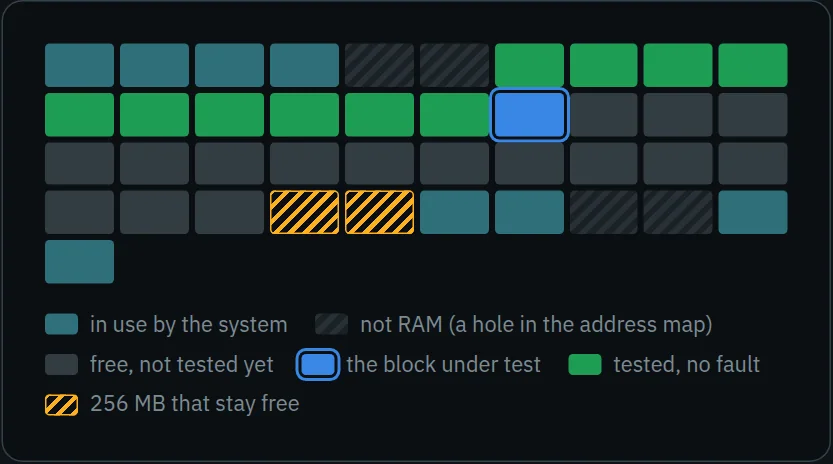
MemHound takes the free memory in blocks of 128 MB. It locks each block in RAM, writes test patterns into it and reads them back. For each faulty word it shows the physical address.
The NAS keeps serving files during the test. MemHound keeps 256 MB of memory free and runs at the lowest priority. If the memory runs out, the system stops MemHound before any other program.
How a test runs
Without options, MemHound runs the whole RAM test in four steps. Step 3 repeats until you press q.
Free the memory
The storage system of QuTS hero: pool, filesystem and checksums in one.
MemHound writes the cache to disk and drops it. On QuTS hero it also empties the ZFS ARC. The test can then use more memory.
Quick pass
Three tests on each block: the address test, a checkerboard and moving inversions with random values.
86 ms for each block of 128 MB
Extended passes
21 tests on each block. Before each pass MemHound frees the memory again. The passes repeat until you press q or MemHound finds a fault.
5.3 s for each block of 128 MB
The result
A large word shows the result. Under it are two lines: what MemHound found and what to do next. Then comes the full summary.
Inside a pass: one block at a time
A pass tests one block at a time and releases it before it takes the next one:
- MemHound takes 128 MB of free memory and locks it with
mlock. The system cannot then move it to swap. - It runs the address test first. If this test fails, MemHound marks all other results as uncertain.
- CPU, procesor
The chip that runs the instructions of programs. It has one or more cores. On Intel and AMD,/proc/cpuinfogives its model asmodel name.It runs the pattern tests. Each test writes the whole block, pushes it out of the CPU cache and then reads it back. - It releases the block and takes the next one. Before each block it checks that 256 MB stay free.
If a word reads back wrong, MemHound reads it again up to 8 times and keeps its physical address. A fault that repeats at the same address is a hard fault. A fault that does not repeat is a transient fault.
The 21 tests of an Extended pass
The time of each test on one block of 128 MB. We measured it with MemHound 0.6.10 on a QNAP NAS with an Intel Core i5-1235U and 16 GB of RAM. Point at a bar to see what the test writes.
One block of 128 MB, all tests
| Step | Result |
|---|---|
| Quick pass | 86 ms |
| Extended pass | 5 337 ms |
| Test | Group | ms | What it does |
|---|---|---|---|
stuck-addr | Address test, first in every pass | 14 | Writes the address of each word into the word, then reads every word back. |
solid0 | Standard tests | 13 | Writes all bits 0, then reads them back. |
solid1 | Standard tests | 14 | Writes all bits 1, then reads them back. |
checker | Also in the Quick pass | 24 | Writes alternating 0 and 1 bits, then the inverse pattern. |
movinv0 | Standard tests | 28 | Moving inversions: fills with 0, then reads and inverts each word, first upward, then downward. |
movinv1 | Standard tests | 26 | The same moving inversions, starting from all bits 1. |
movinv-rand | Also in the Quick pass | 31 | Moving inversions with random values that a seed can repeat. |
modulo20 | Standard tests | 250 | Writes a value into every 20th word and its inverse into all other words, 20 times. |
walk | Standard tests | 1 590 | Moves a single 1 bit through each position of the word, then a single 0 bit. |
movinv8 | Standard tests | 206 | Moving inversions with 8 byte patterns, one set bit in each. |
blockseq | Standard tests | 209 | Fills the block with 16 byte values (00, 55, AA, FF and others) and reads each back. |
bitflip | Standard tests | 1 626 | Alternates a word with one bit set and a word with only that bit clear, for each of the 64 bits. |
bitspread | Standard tests | 805 | The same with two adjacent bits, for each adjacent pair of the 64 bits. |
rand-dual | Standard tests | 71 | Writes the same random values into both halves of the block and compares the halves. |
cmp-xor | Compare tests | 58 | Both halves get random values combined with one number by XOR, then MemHound compares them. |
cmp-sub | Compare tests | 58 | The same compare, with subtraction. |
cmp-mul | Compare tests | 58 | The same compare, with multiplication. |
cmp-div | Compare tests | 66 | The same compare, with division. |
cmp-or | Compare tests | 58 | The same compare, with OR. |
cmp-and | Compare tests | 57 | The same compare, with AND. |
seqinc | Compare tests | 75 | The same compare, with values that increase from word to word. |
The address test
A memory module finds a word by its address. If an address line is broken, two addresses lead to the same cell. Then a pattern test can write and read the same wrong cell and see no fault.
So the address test runs first, on each block. It writes the address of each word into the word. Then it reads every word back. A word that holds the address of another word shows a broken address line.
If the address test fails, the result is CRITICAL: the other tests of that run cannot prove anything.
With line 5 stuck, the writes to 1020 to 1038 land in the cells of 1000 to 1018. The first four words then read back the wrong addresses.
| Address | Written | Read back |
|---|---|---|
| 1000 | 1000 | 1000 ✓ |
| 1008 | 1008 | 1008 ✓ |
| 1010 | 1010 | 1010 ✓ |
| 1018 | 1018 | 1018 ✓ |
| 1020 | 1020 | 1020 ✓ |
| 1028 | 1028 | 1028 ✓ |
| 1030 | 1030 | 1030 ✓ |
| 1038 | 1038 | 1038 ✓ |
| Address | Written | Read back |
|---|---|---|
| 1000 | 1000 | 1020 ✖ |
| 1008 | 1008 | 1028 ✖ |
| 1010 | 1010 | 1030 ✖ |
| 1018 | 1018 | 1038 ✖ |
| 1020 | 1020 | 1020 ✓ |
| 1028 | 1028 | 1028 ✓ |
| 1030 | 1030 | 1030 ✓ |
| 1038 | 1038 | 1038 ✓ |
What each result means
At the end of a test that you started yourself, MemHound shows one of six words in large letters. A test from the StorageDiag app, the USB image or the LiveCD countdown does not show this screen.
Exit codes of the whole test, for scripts: 0 PASSED, 1 hard faults, 2 transient faults only, 3 CRITICAL or PARTIAL.
Two test runs, recorded
Two runs of MemHound 0.6.10 on a QNAP NAS, in a terminal of 80 by 25 characters. The first run ends with PASSED. In the second run, --demo fault flips one bit on purpose, and the run ends with BAD RAM.
./memhound --demo pass --ui2
   ╔═════════════════════ MemHound 0.6.10: the result ══════════════════════╗
   ║                                                                        ║
   ║            ▄▄▄▄▄▄  ▄▄▄▄▄▄▄ ▄▄▄▄▄▄▄ ▄▄▄▄▄▄▄ ▄▄▄▄▄▄▄ ▄▄▄▄▄▄              ║
   ║            ███ ███ ███ ███ ███▄▄▄▄ ███▄▄▄▄ ███ ███ ███ ███             ║
   ║            ▓▓▓ █▓█ ▓▓▓▀▓▓▓ ▀▀▀▀▓▓▓ ▀▀▀▀▓▓▓ ▓▓▓▄▀▀▀ ▓▓▓ ▓▓▓             ║
   ║            ▒▒▒▀▀▀  ▒▒▒ ▒▒▒ ▒▒▒ ▒▒▒ ▒▒▒ ▒▒▒ ▒▒▒ ▄▄▄ ▒▒▒ ▒▒▒             ║
   ║            ░░░     ░░░ ░░░ ░░░ ░░░ ░░░ ░░░ ░░░ ░░░ ░░░ ░░░             ║
   ║            ▀▀▀     ▀▀▀ ▀▀▀ ▀▀▀▀▀▀▀ ▀▀▀▀▀▀▀ ▀▀▀▀▀▀▀ ▀▀▀▀▀▀              ║
   ║                                                                        ║
   ║                   No faults found. Tested 12.75GiB.                    ║
   ║         Demo run (--demo pass): 10 seconds of the Quick test.          ║
   ║                                                                        ║
   ║         Press Enter, Space, Esc or Q to see the full summary.          ║
╚════════════════════════════════════════════════════════════════════════╝: Recorded on 2026-11-16 from the real program. The demo tests 256 MB for 10 seconds. A real test runs longer. Font: IBM VGA 8x16 from The Ultimate Oldschool PC Font Pack by VileR, CC BY-SA 4.0. int10h.org · LICENSE-oldschool-pc-fonts.txt
Run it over SSH
Sign in to the NAS over SSH as an administrator and run these commands. The archive contains the program for three processor types. The commands select the one for your NAS.
# on the NAS, over SSH
arch=$(uname -m)
# uname says armv7l; the program is named armhf
[ "$arch" = armv7l ] && arch=armhf
wget https://pub.nasutils.net/memhound/bin/memhound.tar.gz
tar zxvf memhound.tar.gz
chmod +x memhound*
./memhound-$archMemHound installs nothing. To remove it, delete the files.
Common commands
./memhound-$archThe whole test: Quick, then Extended passes until you press q../memhound-$arch --passes 2The same, and the test stops by itself after 2 Extended passes../memhound-$arch --quickOne Quick pass../memhound-$arch --fullTests nearly all free memory in one run. Use it when the NAS is idle../memhound-$arch --report /tmp/memhound.txtAlso writes the summary to a text file.- latency, opóźnienie
The time between a request and its answer../memhound-$arch --bench --ui2Measures memory speed and latency, without a fault test. ./memhound-$arch --demo pass --ui2A demo run of 10 seconds that ends with PASSED.--demo faultends with BAD RAM../memhound-$arch --helpShows all options.
Download
The program for x86_64, aarch64 and armhf, and the LiveCD for PCs and x86 NAS models.
- memhound.tar.gz The program for 3 processor types, in one archive
- pub/memhound/bin/ Each program file on its own
- memhound-livecd-0.6.10.iso LiveCD 0.6.10, ISO image, 57 MB
- memhound-livecd-0.6.10.iso.sha256 SHA-256 of the LiveCD image
- pub/memhound/livecd/source/ The source code of the GPL parts of the LiveCD
Test nearly all of the memory: the LiveCD
On a running NAS, QTS and its apps use part of the memory, and MemHound cannot test that part. The LiveCD starts a small Linux system with only MemHound in it, so the test reaches nearly all of the RAM.
It starts PCs and x86 NAS models with an HDMI port. An ARM NAS cannot start it. If Secure Boot is on, switch it off first.
- Write the ISO image to a USB stick with balenaEtcher, Rufus or
dd, or burn it to a CD. - Connect a monitor and a USB keyboard, then start the computer from the stick.
- Press 1 to start the test. If you press no key, the test starts by itself after 15 seconds, and a clean result restarts the computer 60 seconds later.
- Read the report in the folder
memhoundon the stick. On a stick written whole, it is on the partition MHDATA. If the memory is bad, the result stays on the screen and the computer stops.
Limits
- On a running NAS, MemHound tests only the free memory. If it reaches less than 80% of the RAM, the result is PARTIAL. The LiveCD reaches nearly all of it.
- MemHound runs as a normal program, so the test also uses the processor, its cache and the memory controller. A fault shows that this chain failed. Hard faults at fixed physical addresses point to a memory module.
- Physical addresses need the root account. Without it, MemHound shows a logical map.
- MemHound names the slot of a fault only if the system has EDAC labels for its modules.
--demo faultflips a bit on purpose. Its BAD RAM is not a test result.