DriveTime: a surface test that tells a failing disk from its slot
Original: nasutils.net/drivetime.html. Version of 2026-11-26.
One static program tests a disk of a QNAP NAS over SSH. It tells a failing disk from a bad slot, cable, backplane or controller.
Topic: Pools, RAID and drives
The drive's own counters and self-tests that describe its condition.
DriveTime reads the disk in 4096 places and draws each place as one cell of a map. A SATA or SAS drive checks its own surface with VERIFY, and 128 more reads travel the whole way from the disk to the controller. Before and after the test, DriveTime reads the drive's SMART counters and the error counters of its link.
The drives that form one RAID; a pool consists of one or more groups.
The test only reads. DriveTime sends the drive no write command, tests one disk at a time and slows down when the disk gets close to its temperature limit. The disk stays in its RAID group during the test.
How a test runs
A test goes through eight steps on one disk. The screen shows each step as a dot. A quick test reads 1 MiB in each cell; a full test reads every cell whole.
Identify the disk
Several drives used as one so that data can survive a drive failure (except RAID 0).
DriveTime finds the disk by its serial number. It notes the controller, the port and the RAID group of the disk.
Counters before the test
The record of events that the Linux kernel writes.
It reads the SMART counters, the drive's error log, the SATA link counters and the kernel log.
smartctl -x, SATA PHY counters
Surface map
4096 cells from the start to the end of the disk. On a SATA or SAS disk the drive checks each cell itself with VERIFY.
READ samples
128 reads of 1 MiB, spread over the disk. Each byte goes through the controller, the cable and the backplane.
Retries
DriveTime reads each failed range again 3 times over the link, and on a SATA or SAS disk 3 times inside the drive. On a hard disk it also reads slow places again.
SMART self-test
The drive runs its own short self-test. Nothing on the map changes in this step.
Counters after the test
DriveTime reads the same counters again and keeps only what changed during the test.
Verdict
It weighs the map, the retries, the changes of the counters and what the drive reports about itself.
One quick test, measured
The protocol fast SSDs use over PCIe.
The time of each step of a quick test of a 1.92 TB NVMe drive. We measured it with the DriveTime CLI on a QNAP NAS with an Intel Core i5-1235U and two QNAP SSD700D1 drives.
| Step | Result |
|---|---|
| Identify the disk, counters before | 1 s |
| Surface map, 4096 MiB | 3 s |
| READ samples and retries | 2 s |
| SMART self-test, counters after, verdict | 110 s |
Inside the drive, or over the link
A read error alone does not say where the fault is. The disk can be failing. The data can also be damaged on its way to the controller: in the slot, the cable or the backplane.
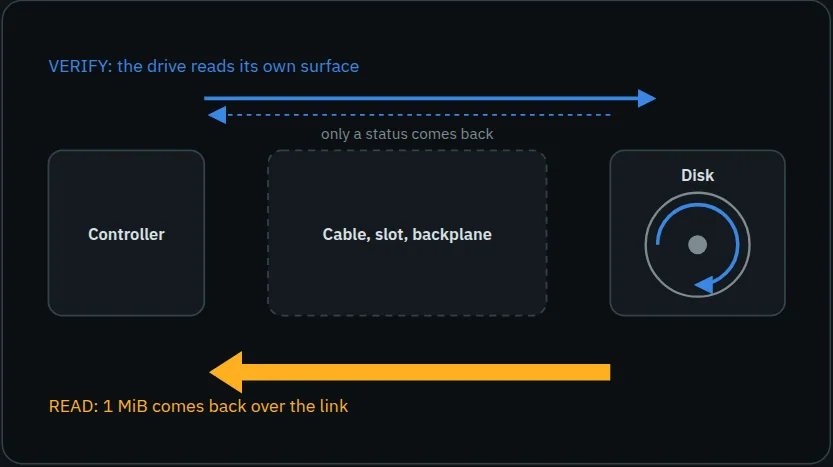
So DriveTime reads the disk in two ways. With VERIFY, the drive reads its own surface and sends back only a status. No data crosses the cable. With READ, every byte goes through the controller, the cable and the backplane.
If VERIFY fails again at the same address, the drive cannot read its own surface: the disk is at fault. If VERIFY passes but READ fails, or the CRC counters of the link grow, the path is at fault.
An NVMe drive has no SATA link counters, so DriveTime does not judge its link. If the drive does not support the NVMe Verify command, DriveTime reads its map with READ. The QNAP SSD700D1 measured here is such a drive.
The surface map
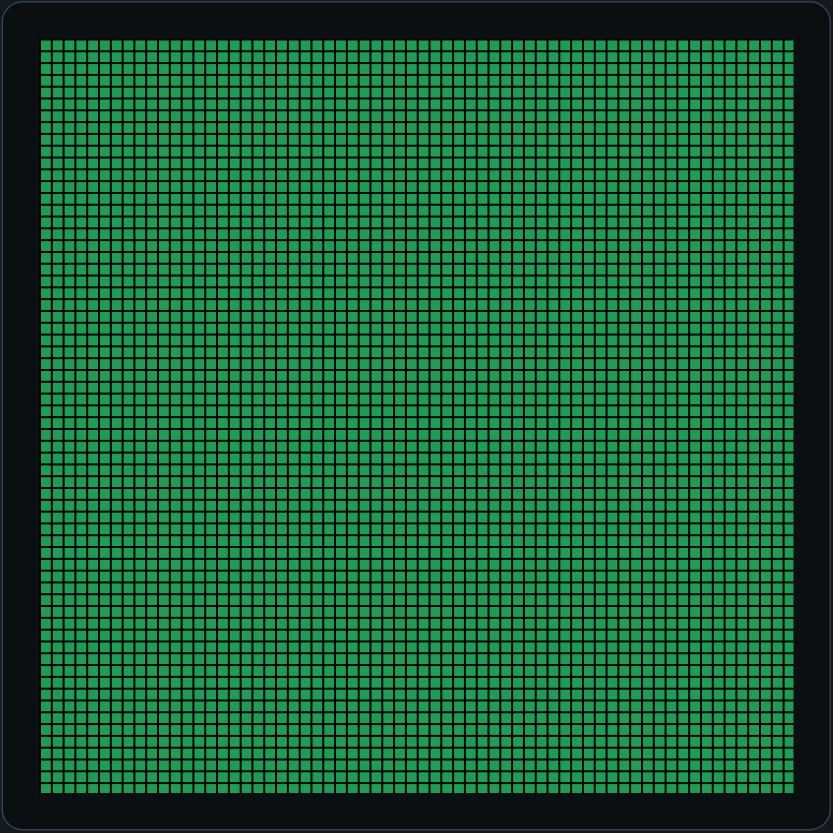
Cell 0 is the start of the disk, at the top left. The colour of a cell is the time the drive needed for 1 MiB: green up to 10 ms, amber up to 150 ms, red over 500 ms.
A letter marks an error: B for a bad block, L for a link error, E for any other error. In a terminal one character can hold several cells. The worst code of them wins, so a bad block never disappears.
On a hard disk, DriveTime reads a command again up to 3 times if it took 500 ms or more and at least 10 times the median. If it is slow again on 2 tries, the place is a weak spot: the drive reads it only after long internal retries. A weak spot turns its cell red.
- not tested yet
- up to 10 ms per MiB
- up to 25 ms
- up to 50 ms
- up to 150 ms
- up to 500 ms
- over 500 ms, or a weak spot
- Bbad block: a medium error
- Llink error: READ failed where VERIFY passed
- Eother error: a timeout or an unknown answer
Four NVMe drives, one quick test each
The quick tests of the four drives of two QNAP NAS units with an Intel Core i5-1235U, on 2026-11-16. The average is the speed of the map, from the first cell to the last.
| Drive | Average, MiB/s | Peak, MiB/s | Longest command | Highest temperature | Verdict |
|---|---|---|---|---|---|
| NAS 1 · nvme0n1 QNAP SSD700D1-001T92 | 1 287 | 1 337 | 4.3 ms | 47 °C | DISK GOOD |
| NAS 1 · nvme1n1 QNAP SSD700D1-001T92 | 1 322 | 1 351 | 1.6 ms | 49 °C | DISK GOOD |
| NAS 2 · nvme0n1 QNAP SSD700D1-001T92 | 1 362 | 1 417 | 1.4 ms | 49 °C | DISK GOOD |
| NAS 2 · nvme1n1 QNAP SSD700D1-001T92 | 1 376 | 1 406 | 2.4 ms | 50 °C | DISK GOOD |
What each verdict means
At the end of a test the screen shows one of five verdicts. A test that you stopped has no verdict. The StorageDiag app shows the same verdict in its DriveTime window.
The disk is good. If QTS marked it as failed, you can clear the flag.
- sector, sektor
The smallest block of data a drive reads or writes.DISK REPORTS PROBLEMS The surface reads, but the drive reports problems: sectors it replaced, read errors in its own error log, failed self-tests from before. Or some places read very slowly on every retry.Back up the data and plan to replace the disk. The flag stays.
- LINK OR BACKPLANE VERIFY passed inside the drive, but the data over the link failed, or the CRC or link counters grew.
Move the disk to another slot and test it again. If the error stays with the slot, the backplane or the cable is at fault.
Test again. If the disk dropped off, test it in another slot.
With --plain, the program ends with exit code 3 when the verdict is DISK BAD, and with 0 otherwise.
The QNAP error flag
When QTS marks a disk as failed, it writes a line pd_err_wwn_ with the disk's ID (WWN) into /mnt/HDA_ROOT/.conf. DriveTime can remove that flag, but only after a fresh test cleared the disk.
A flag on a disk that is failing protects your data. So DriveTime clears it only when the newest test of that disk ended with DISK GOOD or LINK OR BACKPLANE, no more than 7 days ago.
The space of one or more RAID groups from which volumes are made.
Clearing the flag does not return the disk to its RAID group or storage pool. A rebuild is still needed.
What DriveTime does when you clear the flag:
- It checks the newest test of the disk. DISK BAD, DISK REPORTS PROBLEMS, INCONCLUSIVE, a stopped test or a test older than 7 days does not clear the flag.
- It saves a copy of
.confin the folderflag-backupsof its data. - It asks QTS to clear the flag with
hal_event. - If the line is still there after 10 seconds, it removes that one line from the file. Every other line stays as it was.
In the StorageDiag app, an administrator clears the flag with the button Clear the flag on the Surface test tab. In the terminal: flags lists the flags, flag-clear --wwn <WWN> clears one.
A quick test, recorded
A quick test of a QNAP SSD700D1 in a QNAP NAS, on the screen of the DriveTime CLI in a terminal of 120 by 40 characters. The map fills in 3 seconds. Then the drive runs its self-test, and the verdict comes after 1 min 57 s.
./drivetimed-cli-x86_64 --serial 521250710054000230 --mode quick ◆ DRIVETIME SURFACE TEST QNAP SSD700D1-001T92 · /dev/nvme0n1 · 1.9 TB 23:19:05
╭ Surface map ─────────────────────────────────────────── 4096 × 468.7 MB · READ ─╮ ╭ Disk ────────────────────────────╮
│ ▀▀▀▀▀▀▀▀▀▀▀▀▀▀▀▀▀▀▀▀▀▀▀▀▀▀▀▀▀▀▀▀▀▀▀▀▀▀▀▀▀▀▀▀▀▀▀▀▀▀▀▀▀▀▀▀▀▀▀▀▀▀▀ │ │ Model QNAP SSD700D1-001T92 │
│ ▀▀▀▀▀▀▀▀▀▀▀▀▀▀▀▀▀▀▀▀▀▀▀▀▀▀▀▀▀▀▀▀▀▀▀▀▀▀▀▀▀▀▀▀▀▀▀▀▀▀▀▀▀▀▀▀▀▀▀▀▀▀▀ │ │ Serial 521250710054000230 │
│ ▀▀▀▀▀▀▀▀▀▀▀▀▀▀▀▀▀▀▀▀▀▀▀▀▀▀▀▀▀▀▀▀▀▀▀▀▀▀▀▀▀▀▀▀▀▀▀▀▀▀▀▀▀▀▀▀▀▀▀▀▀▀▀ │ │ Device /dev/nvme0n1 │
│ ▀▀▀▀▀▀▀▀▀▀▀▀▀▀▀▀▀▀▀▀▀▀▀▀▀▀▀▀▀▀▀▀▀▀▀▀▀▀▀▀▀▀▀▀▀▀▀▀▀▀▀▀▀▀▀▀▀▀▀▀▀▀▀ │ │ Size 1.9 TB · nvme │
│ ▀▀▀▀▀▀▀▀▀▀▀▀▀▀▀▀▀▀▀▀▀▀▀▀▀▀▀▀▀▀▀▀▀▀▀▀▀▀▀▀▀▀▀▀▀▀▀▀▀▀▀▀▀▀▀▀▀▀▀▀▀▀▀ │ ╰──────────────────────────────────╯
│ ▀▀▀▀▀▀▀▀▀▀▀▀▀▀▀▀▀▀▀▀▀▀▀▀▀▀▀▀▀▀▀▀▀▀▀▀▀▀▀▀▀▀▀▀▀▀▀▀▀▀▀▀▀▀▀▀▀▀▀▀▀▀▀ │ ╭ Run ─────────────────────────────╮
│ ▀▀▀▀▀▀▀▀▀▀▀▀▀▀▀▀▀▀▀▀▀▀▀▀▀▀▀▀▀▀▀▀▀▀▀▀▀▀▀▀▀▀▀▀▀▀▀▀▀▀▀▀▀▀▀▀▀▀▀▀▀▀▀ │ │ Status Test finished │
│ ▀▀▀▀▀▀▀▀▀▀▀▀▀▀▀▀▀▀▀▀▀▀▀▀▀▀▀▀▀▀▀▀▀▀▀▀▀▀▀▀▀▀▀▀▀▀▀▀▀▀▀▀▀▀▀▀▀▀▀▀▀▀▀ │ │ Mode Daily │
│ ▀▀▀▀▀▀▀▀▀▀▀▀▀▀▀▀▀▀▀▀▀▀▀▀▀▀▀▀▀▀▀▀▀▀▀▀▀▀▀▀▀▀▀▀▀▀▀▀▀▀▀▀▀▀▀▀▀▀▀▀▀▀▀ │ │ Cells 4,096 / 4,096 │
│ ▀▀▀▀▀▀▀▀▀▀▀▀▀▀▀▀▀▀▀▀▀▀▀▀▀▀▀▀▀▀▀▀▀▀▀▀▀▀▀▀▀▀▀▀▀▀▀▀▀▀▀▀▀▀▀▀▀▀▀▀▀▀▀ │ │ Elapsed 1 min 57 s │
│ ▀▀▀▀▀▀▀▀▀▀▀▀▀▀▀▀▀▀▀▀▀▀▀▀▀▀▀▀▀▀▀▀▀▀▀▀▀▀▀▀▀▀▀▀▀▀▀▀▀▀▀▀▀▀▀▀▀▀▀▀▀▀▀ │ │ Self-test passed │
│ ▀▀▀▀▀▀▀▀▀▀▀▀▀▀▀▀▀▀▀▀▀▀▀▀▀▀▀▀▀▀▀▀▀▀▀▀▀▀▀▀▀▀▀▀▀▀▀▀▀▀▀▀▀▀▀▀▀▀▀▀▀▀▀ │ ╰──────────────────────────────────╯
│ ▀▀▀▀▀▀▀▀▀▀▀▀▀▀▀▀▀▀▀▀▀▀▀▀▀▀▀▀▀▀▀▀▀▀▀▀▀▀▀▀▀▀▀▀▀▀▀▀▀▀▀▀▀▀▀▀▀▀▀▀▀▀▀ │ ╭ Pace ────────────────────────────╮
│ ▀▀▀▀▀▀▀▀▀▀▀▀▀▀▀▀▀▀▀▀▀▀▀▀▀▀▀▀▀▀▀▀▀▀▀▀▀▀▀▀▀▀▀▀▀▀▀▀▀▀▀▀▀▀▀▀▀▀▀▀▀▀▀ │ │ Average 1.32 GB/s ▁█ │
│ ▀▀▀▀▀▀▀▀▀▀▀▀▀▀▀▀▀▀▀▀▀▀▀▀▀▀▀▀▀▀▀▀▀▀▀▀▀▀▀▀▀▀▀▀▀▀▀▀▀▀▀▀▀▀▀▀▀▀▀▀▀▀▀ │ │ peak 1380 MB/s │
│ ▀▀▀▀▀▀▀▀▀▀▀▀▀▀▀▀▀▀▀▀▀▀▀▀▀▀▀▀▀▀▀▀▀▀▀▀▀▀▀▀▀▀▀▀▀▀▀▀▀▀▀▀▀▀▀▀▀▀▀▀▀▀▀ │ │ Max temp 50 C/80 ▁▁ │
│ ▀▀▀▀▀▀▀▀▀▀▀▀▀▀▀▀▀▀▀▀▀▀▀▀▀▀▀▀▀▀▀▀▀▀▀▀▀▀▀▀▀▀▀▀▀▀▀▀▀▀▀▀▀▀▀▀▀▀▀▀▀▀▀ │ │ Guard never slowed │
│ ▀▀▀▀▀▀▀▀▀▀▀▀▀▀▀▀▀▀▀▀▀▀▀▀▀▀▀▀▀▀▀▀▀▀▀▀▀▀▀▀▀▀▀▀▀▀▀▀▀▀▀▀▀▀▀▀▀▀▀▀▀▀▀ │ ╰──────────────────────────────────╯
│ ▀▀▀▀▀▀▀▀▀▀▀▀▀▀▀▀▀▀▀▀▀▀▀▀▀▀▀▀▀▀▀▀▀▀▀▀▀▀▀▀▀▀▀▀▀▀▀▀▀▀▀▀▀▀▀▀▀▀▀▀▀▀▀ │ ╭ Counters during the test ────────╮
│ ▀▀▀▀▀▀▀▀▀▀▀▀▀▀▀▀▀▀▀▀▀▀▀▀▀▀▀▀▀▀▀▀▀▀▀▀▀▀▀▀▀▀▀▀▀▀▀▀▀▀▀▀▀▀▀▀▀▀▀▀▀▀▀ │ │ Bad blocks (B) 0 │
│ ▀▀▀▀▀▀▀▀▀▀▀▀▀▀▀▀▀▀▀▀▀▀▀▀▀▀▀▀▀▀▀▀▀▀▀▀▀▀▀▀▀▀▀▀▀▀▀▀▀▀▀▀▀▀▀▀▀▀▀▀▀▀▀ │ │ Link errors (L) 0 │
│ ▀▀▀▀▀▀▀▀▀▀▀▀▀▀▀▀▀▀▀▀▀▀▀▀▀▀▀▀▀▀▀▀▀▀▀▀▀▀▀▀▀▀▀▀▀▀▀▀▀▀▀▀▀▀▀▀▀▀▀▀▀▀▀ │ │ Other errors (E) 0 │
│ ▀▀▀▀▀▀▀▀▀▀▀▀▀▀▀▀▀▀▀▀▀▀▀▀▀▀▀▀▀▀▀▀▀▀▀▀▀▀▀▀▀▀▀▀▀▀▀▀▀▀▀▀▀▀▀▀▀▀▀▀▀▀▀ │ │ Slow cells 0 │
│ ▀▀▀▀▀▀▀▀▀▀▀▀▀▀▀▀▀▀▀▀▀▀▀▀▀▀▀▀▀▀▀▀▀▀▀▀▀▀▀▀▀▀▀▀▀▀▀▀▀▀▀▀▀▀▀▀▀▀▀▀▀▀▀ │ │ Reallocated (5) +0 │
│ ▀▀▀▀▀▀▀▀▀▀▀▀▀▀▀▀▀▀▀▀▀▀▀▀▀▀▀▀▀▀▀▀▀▀▀▀▀▀▀▀▀▀▀▀▀▀▀▀▀▀▀▀▀▀▀▀▀▀▀▀▀▀▀ │ │ UDMA CRC (199) +0 │
│ ▀▀▀▀▀▀▀▀▀▀▀▀▀▀▀▀▀▀▀▀▀▀▀▀▀▀▀▀▀▀▀▀▀▀▀▀▀▀▀▀▀▀▀▀▀▀▀▀▀▀▀▀▀▀▀▀▀▀▀▀▀▀▀ │ ╰──────────────────────────────────╯
│ ▀▀▀▀▀▀▀▀▀▀▀▀▀▀▀▀▀▀▀▀▀▀▀▀▀▀▀▀▀▀▀▀▀▀▀▀▀▀▀▀▀▀▀▀▀▀▀▀▀▀▀▀▀▀▀▀▀▀▀▀▀▀▀ │ ╭ Verdict ─────────────────────────╮
│ ▀▀▀▀▀▀▀▀▀▀▀▀▀▀▀▀▀▀▀▀▀▀▀▀▀▀▀▀▀▀▀▀▀▀▀▀▀▀▀▀▀▀▀▀▀▀▀▀▀▀▀▀▀▀▀▀▀▀▀▀▀▀▀ │ │ ◆ DISK GOOD │
│ ▀▀▀▀▀▀▀▀▀▀▀▀▀▀▀▀▀▀▀▀▀▀▀▀▀▀▀▀▀▀▀▀▀▀▀▀▀▀▀▀▀▀▀▀▀▀▀▀▀▀▀▀▀▀▀▀▀▀▀▀▀▀▀ │ │ • No media or link errors in the │
│ ▀▀▀▀▀▀▀▀▀▀▀▀▀▀▀▀▀▀▀▀▀▀▀▀▀▀▀▀▀▀▀▀▀▀▀▀▀▀▀▀▀▀▀▀▀▀▀▀▀▀▀▀▀▀▀▀▀▀▀▀▀▀▀ │ │ test window. │
│ ▀▀▀▀▀▀▀▀▀▀▀▀▀▀▀▀▀▀▀▀▀▀▀▀▀▀▀▀▀▀▀▀▀▀▀▀▀▀▀▀▀▀▀▀▀▀▀▀▀▀▀▀▀▀▀▀▀▀▀▀▀▀▀ │ │ • NVMe has no SATA link │
│ ▀▀▀▀▀▀▀▀▀▀▀▀▀▀▀▀▀▀▀▀▀▀▀▀▀▀▀▀▀▀▀▀▀▀▀▀▀▀▀▀▀▀▀▀▀▀▀▀▀▀▀▀▀▀▀▀▀▀▀▀▀▀▀ │ │ counters, so the link was not │
│ ▀▀▀▀▀▀▀▀▀▀▀▀▀▀▀▀▀▀▀▀▀▀▀▀▀▀▀▀▀▀▀▀▀▀▀▀▀▀▀▀▀▀▀▀▀▀▀▀▀▀▀▀▀▀▀▀▀▀▀▀▀▀▀ │ │ analysed. │
╰─────────────────────────────────────────────────────────────────────────────────╯ │ │
ms/MiB ≤10 ≤25 ≤50 ≤150 ≤500 >500 B bad block L link E other │ │
● ● ● ● ● ● ● ● ████████████████████████████████████████████████████████ 100.0% │ │
Test finished Daily · 2026-11-16 23:18 ╰──────────────────────────────────╯
q quit 1 Daily 2 Full r pace max d errors ? help: Recorded on 2026-11-16 from the real program. The self-test plays 10 times faster: 107 seconds take 11. Font: IBM VGA 8x16 from The Ultimate Oldschool PC Font Pack by VileR, CC BY-SA 4.0. int10h.org · LICENSE-oldschool-pc-fonts.txt
On a NAS that keeps running
- DriveTime only reads. It opens the disk read-only and checks each command it sends to the drive directly against a list: VERIFY, the NVMe Verify and Identify commands and the reading of the health log. It does not send any other command to the drive, a write included.
- It tests one disk at a time. A test of a second disk waits until the first test ends.
- The temperature limit comes from the drive: 80 °C for the NVMe drive measured here. Close to the limit the test slows down. At the limit it pauses until the disk cools down by 5 to 8 °C.
--max-rate 200keeps the reads at or under 200 MiB/s. Use it when other programs read or write the same disk.- q leaves the screen and the test keeps running. Start the program again to watch it. s stops the test.
Run it over SSH
Sign in to the NAS over SSH as an administrator and run these commands. They download the program for your NAS's processor and open the screen with the list of disks.
# on the NAS, over SSH, as admin
a=$(uname -m)
# uname says armv7l; the program is named armhf (older ARM: armel)
case "$a" in armv7*) a=armhf ;; armv5*|armv6*) a=armel ;; esac
wget https://pub.nasutils.net/drivetime/bin/drivetimed-cli-$a
chmod +x drivetimed-cli-$a
./drivetimed-cli-$aThe program installs nothing. If StorageDiag is installed, the tests go into its data folder and its DriveTime window shows them. Otherwise they go into the folder drivetimed-cli beside the program.
Keys on the screen
- q leave the screen; a running test keeps running
- s stop the running test (it asks first)
- 12 start a quick test, or a full test (it asks first); the screen calls the quick test Daily
- r the read speed of the next test: max, 500, 200 or 50 MB/s
- d the errors found instead of the counters
- l back to the list of disks
Common commands
./drivetimed-cli-$aLists the disks. Enter opens the chosen disk../drivetimed-cli-$a --serial <serial> --mode quickStarts a quick test of one disk and shows it. The serial number is in the list of disks../drivetimed-cli-$a --serial <serial> --mode fullReads the whole surface. On a large hard disk this takes hours../drivetimed-cli-$a --plain --serial <serial> --mode quickProgress lines instead of the screen, and the verdict with its reasons at the end../drivetimed-cli-$a --serial <serial> --mode quick --max-rate 200A quick test that reads at most 200 MiB/s../drivetimed-cli-$a probe-stop --serial <serial>Stops a running test../drivetimed-cli-$a flagsLists the QNAP error flags of the disks../drivetimed-cli-$a --helpShows all commands.
Download
The DriveTime CLI for x86_64, aarch64, armhf and armel. Each file is one static program.
- drivetime-cli.tar.gz The program for 4 processor types, in one archive
- pub/drivetime/bin/ Each program file on its own
The StorageDiag app runs the same test in its DriveTime window, on the Surface test tab. There an administrator also clears the QNAP error flag with one button.
Limits
- A quick test reads 4096 × 1 MiB, a sample of the disk. Only a full test reads the whole surface.
- An NVMe drive has no SATA link counters, so the test cannot blame the link of an NVMe drive.
- A drive or USB adapter that does not accept VERIFY gets a READ map. That map cannot tell the disk from the link.
- DriveTime judges weak spots on hard disks only.
- Starting and stopping a test needs the administrator account. Watching a test does not.