CPUhound: a CPU benchmark for a running NAS
Original: nasutils.net/cpuhound.html. Version of 2026-11-26.
One static program measures the processor of a QNAP NAS over SSH, on one thread and on all cores. Each result comes with a verdict that says whether other programs or heat changed the numbers.
Topic: Memory and processor
A number computed from data that shows whether the data changed.
CPUhound times short workloads on the processor: integer and floating-point math, branches, memory reads, checksums, compression, encryption and vector math. Each subtest runs on one thread, then on all cores.
The chip that runs the instructions of programs. It has one or more cores. On Intel and AMD,
/proc/cpuinfo gives its model as model name.While it measures, CPUhound records how long its threads waited for the CPU, how far the clock fell and how hot the CPU got. The verdict says whether the numbers describe the CPU alone.
How a full run works
Without options, the program asks first and then runs the full benchmark in four steps. Steps 2 and 3 repeat until the score stops moving.
Read the processor
CPUhound reads the processor model, its cores and threads, the highest clock and the instruction sets: AES, SHA, AVX2 and AVX-512 on x86, NEON and the crypto extensions on ARM.
cpuid, HWCAP, /proc/cpuinfo, sysfs
One thread, then all cores
Each subtest runs for 0.6 s on one CPU, then for 0.6 s on all CPUs at once. Each thread stays on its own CPU.
17 s for a round of 13 subtests
Rounds until the score settles
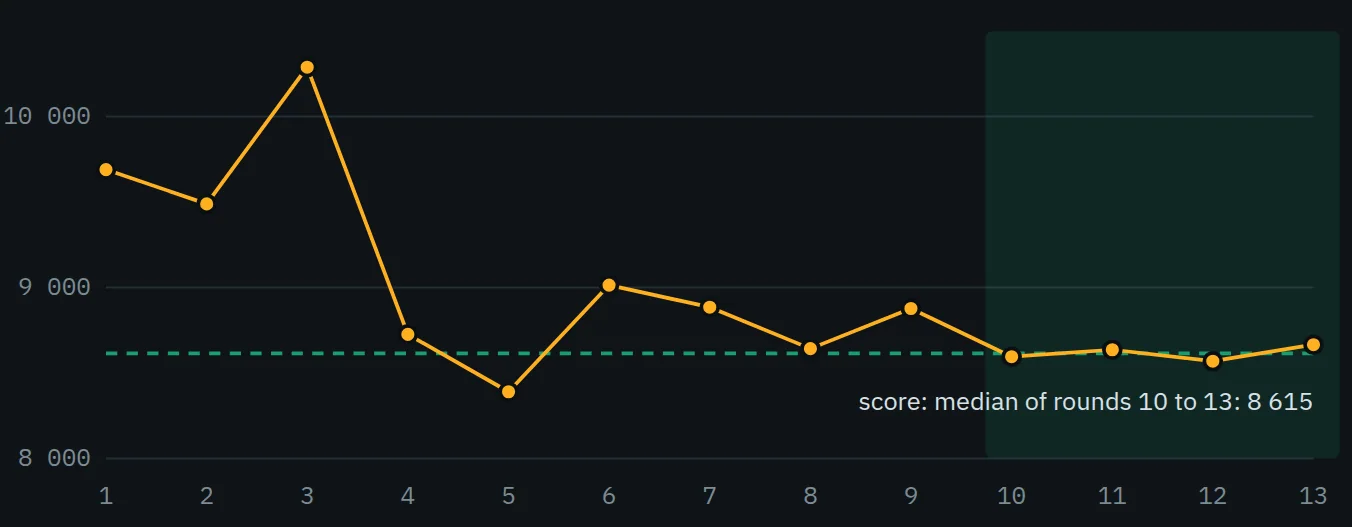
After each round, CPUhound computes the score again. The run ends when the last 4 rounds agree within 1.5 %. It also ends when 5 rounds bring no closer agreement, or after about 5 minutes.
13 rounds in 221 s on a Core i5-1235U
The verdict
The score is the median of the last 4 rounds. Beside it, the verdict says what disturbed the run, and the table shows every subtest.
The probe and the full run
The probe reads what the CPU can do in 3 seconds. The full run measures the CPU under load until the numbers settle.
| Probe | Full run | |
|---|---|---|
| Subtests | int_scalar, fp_scalar and sha256, and sha256 with SHA instructions if the CPU has them | All of them: 9 in plain code, and up to 5 more with special instructions |
| Threads | One | One, then all CPUs |
| Time for each subtest | 0.3 s | 0.6 s on one thread and 0.6 s on all CPUs, in every round |
| Length | 3.0 s after the start at most; 1.3 s on a Core i5-1235U | Until the score settles, about 5 minutes at most; 221 s on a Core i5-1235U |
| Priority | Normal | Real-time, unless you add --quiesce none |
| Score | None: the rates of the subtests only | CPH index for one thread and for all cores |
| Verdict | Always INDICATIVE | CLEAN, CONTENDED, THROTTLED or UNTRUSTED |
Does the NAS keep working during a full run?
A computer made in software, with a system of its own.
In a full run, CPUhound gives its threads real-time priority. Shares, apps and virtual machines then answer slowly or time out until the run ends. On a CPU with 4 threads or fewer, one CPU stays free.
To keep the NAS answering, add --quiesce none. Other programs can then take CPU time, and the verdict can say CONTENDED.
CPUhound does not stop when the CPU gets hot. The CPU slows itself down at its own limit. CPUhound records the highest temperature and the clock, and the verdict says THROTTLED.
If a run ends without cleaning up, the next run does not use real-time priority.
What the verdict is built from
During every phase, CPUhound reads five values from Linux. Four of them have a limit.
Run-queue wait
Time a CPUhound thread was ready to run while another program had its CPU.
Limit: Over 5 % of the thread's CPU time: CONTENDED. With real-time threads, over 10 %.
Involuntary switches
How often the system took the CPU away from a CPUhound thread.
Limit: None; shown beside the wait
Steal time
CPU time that a hypervisor gave to other guests, if the NAS itself runs as a virtual machine.
Limit: Over 0.5 s of CPU time in the run: CONTENDED
Clock
The frequency of each CPU, read every 0.1 s and compared with its own highest value in the same phase.
Limit: Under 90 % of that value: THROTTLED
Temperature
The hottest CPU sensor that Linux reports.
Limit: 95 °C or more: THROTTLED
A NAS with too much other work and a NAS that is too hot both feel slow. The fixes are different: less load, or better cooling. The verdict says which one it was.
In a full run, the verdict looks at the same 4 rounds as the score. One short burst of another program does not decide it.
What each verdict means
The dashboard shows the verdict in its Trust panel, with the reason in one line. The StorageDiag app shows the same verdicts.
- CLEAN No limit was crossed: the wait stayed under its limit, the clock held and the CPU stayed under 95 °C.
The numbers describe this CPU. Compare them with runs of the same CPUhound version.
- CONTENDED Other programs or a hypervisor took more CPU time than the limit. The numbers are lower than the CPU can do.
Stop what uses the NAS, such as backups, scrubs or virtual machines, and run the test again.
- THROTTLED A clock fell under 90 % of its peak, or the CPU reached 95 °C. The numbers show what the NAS keeps up under its own cooling.
If they are lower than you expect, check the fans, the dust filters and the room temperature.
- UNTRUSTED Both at once: other programs took CPU time, and the CPU got hot or its clock fell. The numbers do not describe the CPU alone.
Stop the load, let the NAS cool down and run the test again.
Exit codes, for scripts: 2 UNTRUSTED, 1 the run did not start, 0 every other verdict.
Why the result is a table
Each subtest has its own unit: Mops, Mflops, MB/s or Mderef (memory reads per second). One number would hide which part of the CPU is slow.
So the result is the table: each subtest on one thread, on all cores, and the scaling between them. Scaling is the all-core rate divided by the one-thread rate times the number of CPUs.
A full run also shows the CPH index, for one thread and for all cores. It is 1000 times the geometric mean of 8 subtests, each divided by a fixed reference rate. A CPU at the reference rates scores 1000.
With a geometric mean, a subtest that gets twice as fast raises the index by the same share, whichever subtest it is. The subtests with special instructions stay out of the index, so every CPU is scored on the same code.
The clean full run on a Core i5-1235U, 2026-11-16. A probe has no index.
The subtests, measured
13 subtests of a full run with CPUhound 0.1.1 on a QNAP NAS with an Intel Core i5-1235U: 2 performance and 8 efficiency cores, 12 threads. Each bar shows how many times more work all 12 threads did than one thread. Point at a bar to see what the subtest does.
| Subtest | Instructions | Unit | One thread | All cores | × | Scaling | What it does |
|---|---|---|---|---|---|---|---|
int_scalar | base | Mops | 1 233.8 | 8 401.2 | 6.8 | 57 % | Integer multiply, add, XOR and rotate, in a chain where each step needs the one before. |
fp_scalar | base | Mflops | 1 143.0 | 8 939.5 | 7.8 | 65 % | Floating-point multiply and add, in a chain where each step needs the one before. |
branch | base | Mops | 268.3 | 1 547.6 | 5.8 | 48 % | Random 8-way choices, as an interpreter makes them, so the CPU cannot predict the branches. |
ptr_chase | base | Mderef | 38.8 | 221.4 | 5.7 | 48 % | Follows a random chain of pointers through 16 MiB, so most reads miss the cache and go to the RAM. |
sha256 | soft | MB/s | 348.2 | 1 981.6 | 5.7 | 47 % | SHA-256 checksum of a 64 KiB block, in plain code. |
crc32c | soft | MB/s | 1 392.2 | 11 642.5 | 8.4 | 70 % | CRC32C checksum of a 64 KiB block, in plain code. |
lz4 | soft | MB/s | 804.6 | 3 503.9 | 4.4 | 36 % | Compresses 64 KiB of text in the LZ4 style. |
aes128ctr | soft | MB/s | 230.2 | 973.8 | 4.2 | 35 % | AES-128 encryption in CTR mode of a 64 KiB block, in plain code. |
vec_f32 | base | Mflops | 5 578.1 | 18 495.9 | 3.3 | 28 % | Multiply and add over 8192 floating-point numbers, with the base vector instructions. |
vec_f32 | avx2 | Mflops | 13 360.8 | 36 246.3 | 2.7 | 23 % | The same multiply and add with AVX2 instructions. |
crc32c | hw | MB/s | 10 379.0 | 73 468.7 | 7.1 | 59 % | CRC32C with the CPU's CRC32 instruction. |
sha256 | sha-ni | MB/s | 1 948.2 | 7 149.1 | 3.7 | 31 % | SHA-256 with the CPU's SHA instructions (SHA-NI). |
aes128ctr | aes-ni | MB/s | 7 021.2 | 22 943.8 | 3.3 | 27 % | AES-128 with the CPU's AES instructions (AES-NI). |
Special instructions
A CPU can have instructions for checksums, encryption and vector math. CPUhound runs these subtests twice, in plain code and with the instruction, and shows both.
| Step | Result | What it does |
|---|---|---|
aes128ctr aes-ni | 30.5× | AES-128 with the CPU's AES instructions (AES-NI). soft: 230.2 MB/s · aes-ni: 7 021.2 MB/s |
crc32c hw | 7.5× | CRC32C with the CPU's CRC32 instruction. soft: 1 392.2 MB/s · hw: 10 379.0 MB/s |
sha256 sha-ni | 5.6× | SHA-256 with the CPU's SHA instructions (SHA-NI). soft: 348.2 MB/s · sha-ni: 1 948.2 MB/s |
vec_f32 avx2 | 2.4× | The same multiply and add with AVX2 instructions. base: 5 578.1 Mflops · avx2: 13 360.8 Mflops |
aes128ctr230.2 → 7 021.2 MB/scrc32c1 392.2 → 10 379.0 MB/ssha256348.2 → 1 948.2 MB/svec_f325 578.1 → 13 360.8 Mflops
: One thread on a Core i5-1235U. The Machine panel of the dashboard lists the instructions of the CPU: SSE4.2, AVX, AVX2, AVX-512, SHA-NI and AES-NI on x86.
How a full run settles
The all-core CPH index after each round of the clean full run. From round 4, CPUhound compares the last 4 rounds. At round 13 they agreed within 1.1 %, and the run ended.
| Round | CPH | last 4 rounds differ by |
|---|---|---|
| 1 | 9 690 | – |
| 2 | 9 489 | – |
| 3 | 10 288 | – |
| 4 | 8 726 | 16.3 % |
| 5 | 8 390 | 20.8 % |
| 6 | 9 014 | 21.4 % |
| 7 | 8 885 | 7.1 % |
| 8 | 8 642 | 7.1 % |
| 9 | 8 877 | 4.2 % |
| 10 | 8 595 | 3.3 % |
| 11 | 8 636 | 3.3 % |
| 12 | 8 569 | 3.6 % |
| 13 | 8 666 | 1.1 % |
Two runs, recorded
CPUhound 0.1.1 on the same NAS, in a terminal of 120 by 32 characters. The probe ends after 1.3 s with INDICATIVE. The full run is the second one above, played 10 times faster: it ends after 290 s with THROTTLED.
./cpuhound-cli-x86_64 --probe --ui2 ◆ CPUHOUND · CPU BENCHMARK 12th Gen Intel(R) Core(TM) i5-1235U · 10C/12T hybrid · PROBE 3 s 00:00:01
╭ Machine ─────────────────────────────╮ ╭ Subtests ───────────────────────────────────────────────────────────────────╮
│ 12th Gen Intel(R) Core(TM) i5-1235U │ │ SUBTEST ISA ST MT SCALING WAIT │
│ Cores 2P+8E cores, 12 threads │ │ int_scalar base 1297.9 – single-thread only 0.0% │
│ Clock 4400 MHz max │ │ fp_scalar base 1144.5 – single-thread only 0.0% │
│ SSE4.2 AVX AVX2 AVX-512 │ │ sha256 soft 390.7 – single-thread only 0.0% │
│ SHA-NI AES-NI │ │ sha256 sha-ni 2008.7 – single-thread only 0.0% │
│ │ │ │
╰──────────────────────────────────────╯ │ │
╭ CPH index ───────────────────────────╮ │ │
│ single-thread all cores │ │ │
│ - - │ │ │
│ │ │ │
│ A probe has no index rounds. │ │ │
│ │ │ │
│ │ │ │
│ │ │ │
╰──────────────────────────────────────╯ │ │
╭ Trust ───────────────────────────────╮ │ │
│ ◆ INDICATIVE │ │ │
│ Thermal 85 °C, clock x1.00 │ │ │
│ runqueue wait 0.00%, freq stable, │ │ │
│ thermal max 85.0°C [probe: 3s │ │ │
│ capability reading, not a benchmark] │ │ │
│ │ │ │
│ │ │ │
│ │ │ │
│ │ │ │
│ │ │ │
╰──────────────────────────────────────╯ ╰─────────────────────────────────────────────────────────────────────────────╯
INDICATIVE · 4 subtests in 1.3 s
q quit t 16 colours: Recorded on 2026-11-16 from the real program. In a terminal of 80 by 25 characters, the dashboard shows only the subtests. Font: IBM VGA 8x16 from The Ultimate Oldschool PC Font Pack by VileR, CC BY-SA 4.0. int10h.org · LICENSE-oldschool-pc-fonts.txt
Run it over SSH
Sign in to the NAS over SSH as an administrator and run these commands. They download the program for the processor of your NAS.
# on the NAS, over SSH
a=$(uname -m)
# uname says armv7l; the program is named armhf (older ARM: armel)
[ "$a" = armv7l ] && a=armhf
wget https://pub.nasutils.net/cpuhound/bin/cpuhound-cli-$a
chmod +x cpuhound-cli-$a
./cpuhound-cli-$a --ui2The program asks before the full run. Press q to stop a run early; it still shows the result. t switches between 256 and 16 colours. CPUhound installs nothing. To remove it, delete the file.
Common commands
./cpuhound-cli-$a --ui2Asks, then runs the full benchmark in the dashboard../cpuhound-cli-$a --probe --ui2The probe: it ends 3 seconds after the start../cpuhound-cli-$a --ui2 --yesThe full benchmark without the question../cpuhound-cli-$a --ui2 --quiesce noneThe full benchmark at normal priority. The NAS keeps answering, and the verdict can say CONTENDED../cpuhound-cli-$a --ui2 --cpus 0-3Measures only CPUs 0 to 3../cpuhound-cli-$a --ui2 --subtests int_scalar,sha256Runs only the named subtests../cpuhound-cli-$a --yes --jsonThe full benchmark without the dashboard: one JSON object per line, for scripts../cpuhound-cli-$a --uiThe dashboard in 16 colours, for a terminal without 256../cpuhound-cli-$a --helpShows all options.
Download
Limits
- A probe measures one thread for about a second. It shows what the CPU can do, not what it keeps up under load.
- A full run with real-time threads slows the NAS for up to about 5 minutes. Start it when nobody uses the NAS, or add
--quiesce none. - CPUhound measures speed. It does not look for faults in the CPU or the RAM. For the RAM, use MemHound.
- The one-thread rates come from CPU 0 only.
- Compare numbers only between runs of the same CPUhound version. The numbers depend on how the program was compiled.
- If Linux reports no temperature sensor for the CPU, the verdict sees only the clock.