Run your package's service in a jail: its own account, no root, only the network you allow
Original: nasutils.net/howto-bucketvs-jail.html. Version of 2026-11-26.
A QPKG package's service script runs as root. With the service builder's Start in a jail block, the programs it starts run as an account of their own inside a sandbox: no capabilities, no way to gain them, a filter on dangerous system calls, and a network of their own. The example serves a page and reports, on that page, what the sandbox lets it do.
Topic: System and sign-in
- Profile what runs and what it can access
- Blocks the account, folders and jail configuration
- Build bvs-jail and bwrap included in the package
- Check a page showing the service's runtime environment
The screenshots are from Bucket & Code Server IDE 1.0.0-49. The example was built, installed and checked on a test NAS running QTS 6.1. The profile below uses jailbox as the service account.
01 What the jail provides
- kernel, jądro
The part of Linux that manages the hardware, memory and processes.The services run as the account the profile names, never root, with no capabilities andNoNewPrivsset. A seccomp filter refuses mounts, new namespaces, kernel modules,bpf,io_uring,ptraceand the other calls kernel exploits go through. - They see the app read-only, their data folders read-write, a private
/tmp,/procand/dev, and the NAS's glibc. No other share, no/etc/config, no other package. - Their network is a loopback of their own. Each
inboundport is relayed from the NAS to a port inside. Outbound connections go through an HTTP proxy that refuses private, loopback and the NAS's own addresses. - CPU, procesor
The chip that runs the instructions of programs. It has one or more cores. On Intel and AMD,/proc/cpuinfogives its model asmodel name.jail
An isolated set of files and rights in which a service runs.A memory limit, a CPU share and a process limit hold the whole jail.
The package carries the jail itself: bin/bvs-jail and a static bin/bwrap (bubblewrap), staged by the build for each architecture.
02 Before you start
- Prepare a QPKG project created with New project, QDK from the Toolchains page, and the Ubuntu 24.04 builder environment. Your own App Center explains the setup. This example uses the Empty service preset.
- certificate, certyfikat
A signed file that confirms the key of a domain for HTTPS.You need a code-signing certificate purchased from a certificate authority or issued by QNAP. The certificate and key may be provided as files; the key may also be held on a USB token.
03 The profile
The profile is a JSON file of the package. Here it is shared/etc/jail/jailbox.json in the project, which the package installs as etc/jail/jailbox.json in its install folder.
# shared/etc/jail/jailbox.json
{
  "name": "jailbox",
  "user": "jailbox",
  "app": "@QPKG_ROOT@",
  "data": ["@QPKG_DATA@"],
  "services": [
    {
      "name": "checks",
      "cmd": [
        "@QPKG_ROOT@/bin/busybox",
        "sh",
        "@QPKG_ROOT@/share/jailbox/checks.sh",
        "@QPKG_ROOT@",
        "@QPKG_DATA@"
      ],
      "oneshot": true
    },
    {
      "name": "web",
      "cmd": [
        "@QPKG_ROOT@/bin/busybox",
        "httpd",
        "-f",
        "-p",
        "127.0.0.1:8080",
        "-h",
        "@QPKG_DATA@/www"
      ],
      "wait_port": 8080
    }
  ],
  "inbound": [{ "listen": "0.0.0.0:19975", "port": 8080 }],
  "egress": {},
  "limits": { "memory_mb": 256 },
  "stop_seconds": 10
}@QPKG_ROOT@and@QPKG_DATA@stand for the install and data folders, which are known only on the NAS. At each start, the service script writes the real paths into a copy of the profile that only root can change, and the jail runs that copy. The jail refuses a profile with a key it does not know.- The services see the
appfolder read-only. Here it is the whole install folder, so the services can use the package's own BusyBox. In your own package, point it at the program's own folder, for example@QPKG_ROOT@/app. - The
servicesstart one after another. Aoneshotservice runs to its end before the next one starts. Withwait_port, the next service starts only when this one listens on its port. At least one service must keep running: the jail refuses a profile whose services are all oneshot. inboundrelays port 19975 of the NAS to port 8080 inside.egressgives the services a proxy at127.0.0.1:3128for ports 80 and 443 of public addresses. Anallowlist lets through the host:port pairs it names, also on private addresses, for example a server on your own network.limits.memory_mbis 2048 unless you set it;stop_secondsis how long the jail waits for its services to stop.
The first service runs this script, also in the package, as shared/share/jailbox/checks.sh. It writes what the sandbox allows into the folder the second service serves.
#!/bin/sh
# Runs inside the jail and writes what the sandbox allows into the page folder.
R=$1 D=$2 B=$R/bin/busybox V=$($B dirname "$D")
{
  $B grep -E '^(Uid|CapEff|NoNewPrivs|Seccomp):' /proc/self/status
  if $B touch "$R/probe" 2>/dev/null; then
    echo 'write the install folder: allowed'
  else
    echo 'write the install folder: refused'
  fi
  if $B ls /etc/config >/dev/null 2>&1; then
    echo 'read /etc/config: allowed'
  else
    echo 'read /etc/config: refused'
  fi
  echo "what $V holds here: $($B ls -A "$V" | $B tr '\n' ' ')"
  echo "network interfaces: $($B tail -n +3 /proc/net/dev | $B cut -d: -f1 | $B tr -d ' ' | $B tr '\n' ' ')"
} >"$D/www/checks.txt"
echo 'Served from inside the jail.' >"$D/www/index.html"04 The blocks
On the project's page, open the Service and package card and its Blocks tab. Under At start, use Add a block to add these five blocks, in this order:
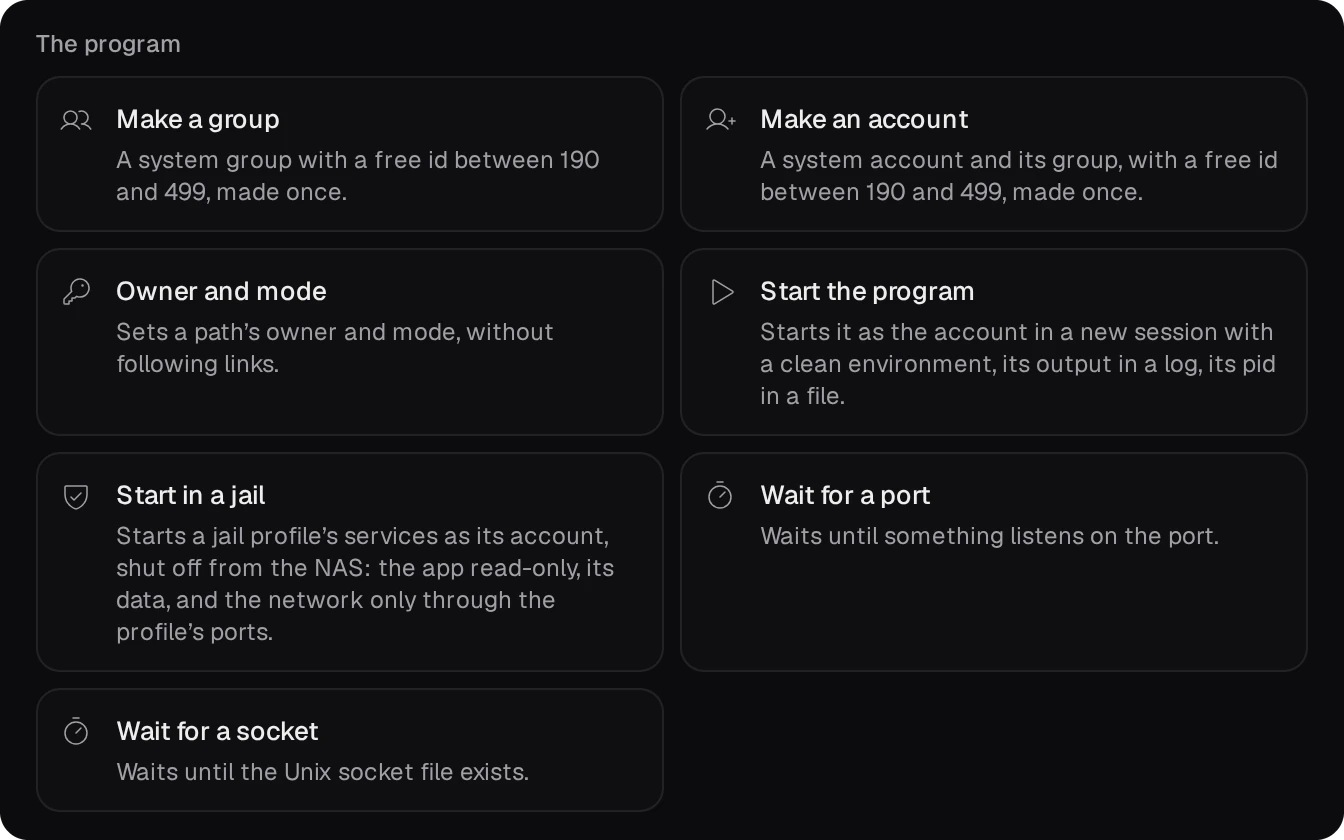
- Data folder on the volume, name
jailbox: the folder$QPKG_DATA. - Create an account, name
jailbox: the account the profile names. - Create a folder,
$QPKG_DATA/www, owned byjailbox:jailbox, mode750: the only folder the services write. - Start in a jail, ID
jailbox, profile$QPKG_ROOT/etc/jail/jailbox.json. Its seconds to wait at stop must be at least the profile'sstop_secondsplus 15; the default 90 is enough here.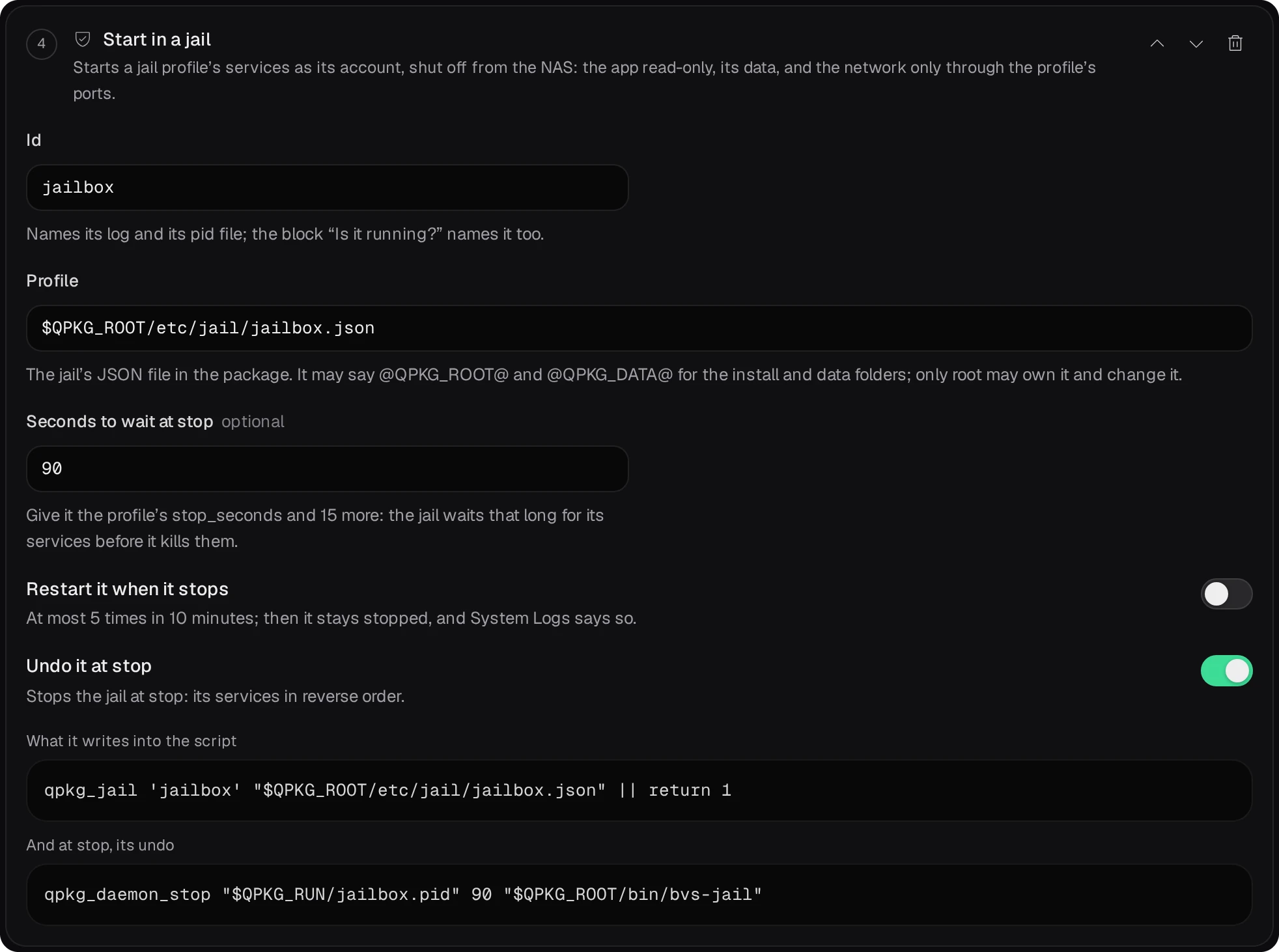
- Wait for a port,
19975: the start ends when the relayed port answers.
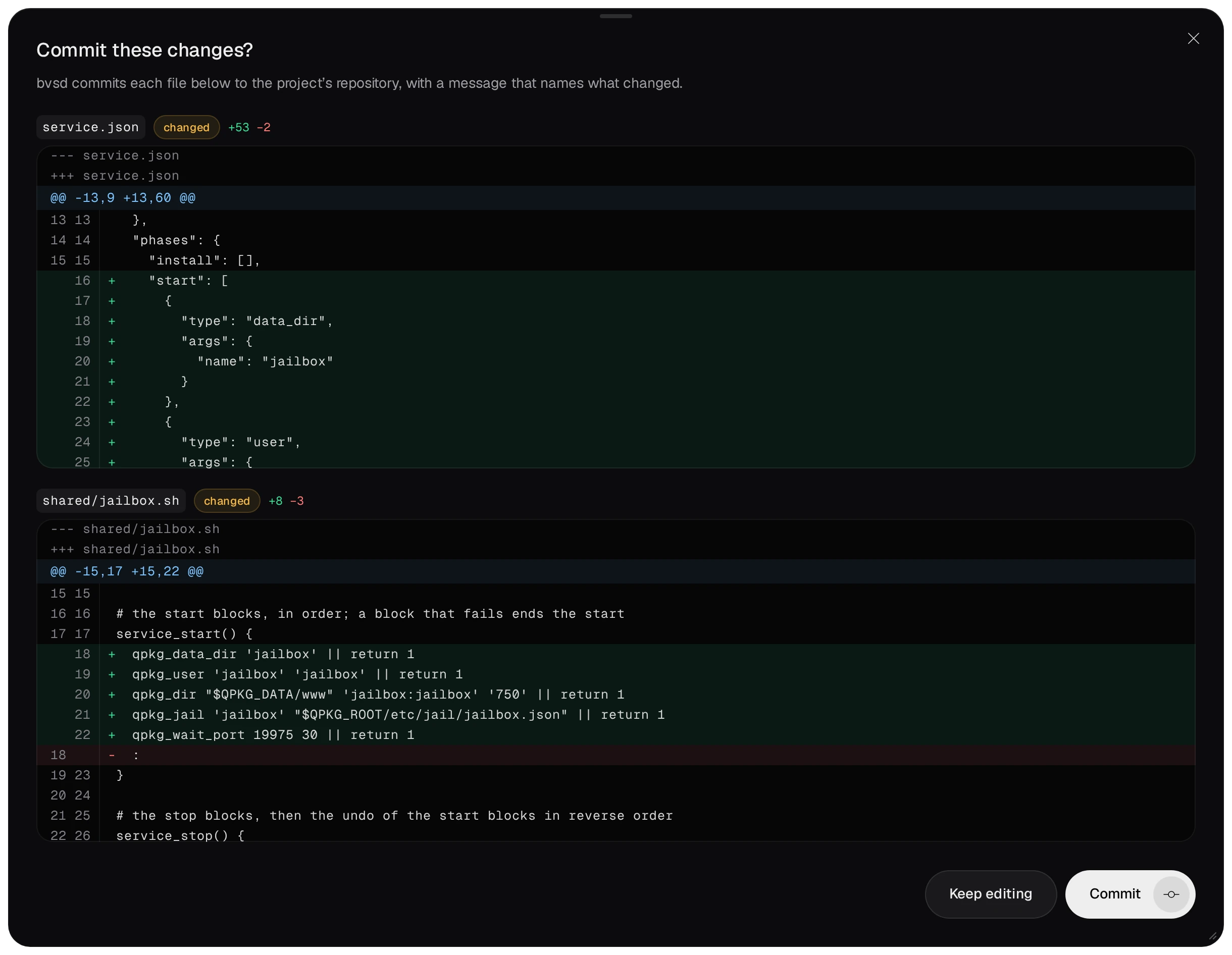
Under At a status check, add Is it running? with the ID jailbox and Is the port open? with 19975. The service script's status command then reports whether the jail runs and its port answers. Save shows each file's diff, and Commit writes them to the project's repository.
05 Build and install
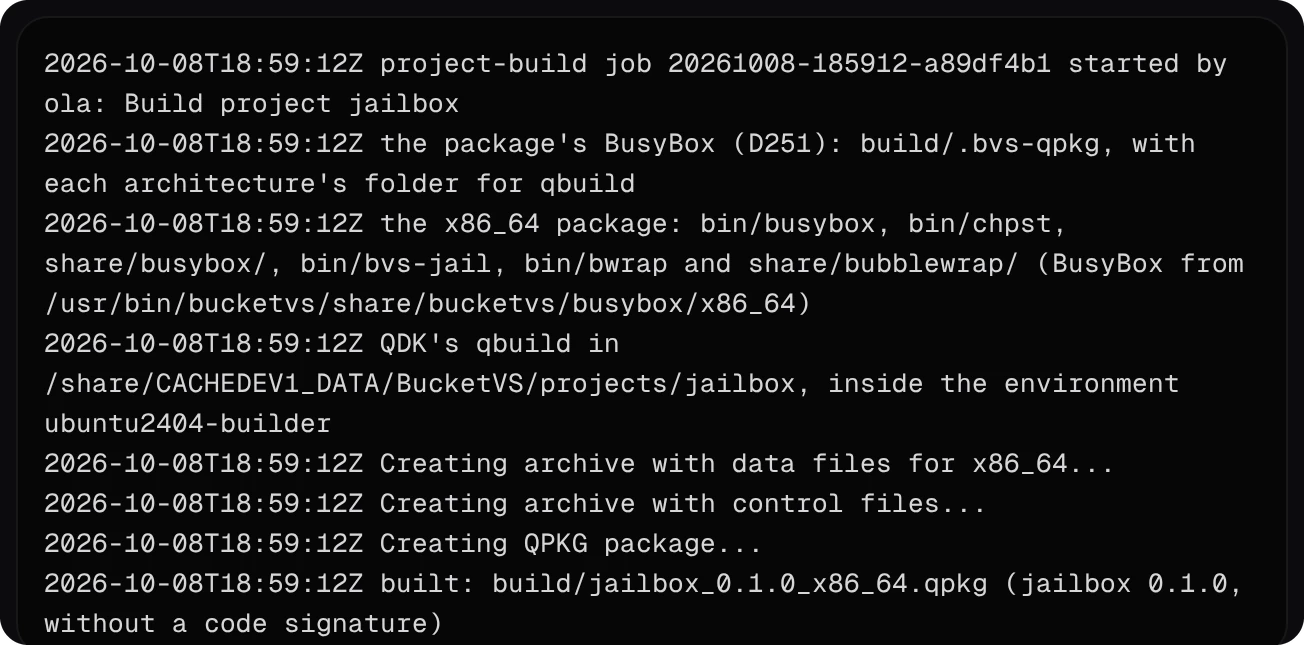
Build in the project's page runs QDK's qbuild. Its log names what the package carries for the jail.
The app store of QTS and QuTS hero.
Install the package using Test deploy on the project page as an administrator, Install Manually in App Center, or your own App Center repository on the NAS.
06 Check isolation
Open http://<NAS address>:19975/: the page says “Served from inside the jail.”, through the relayed port. checks.txt beside it holds what the first service found:
# http://192.168.1.20:19975/checks.txt
Uid:	222	222	222	222
CapEff:	0000000000000000
NoNewPrivs:	1
Seccomp:	2
write the install folder: refused
read /etc/config: refused
what /share/CACHEDEV1_DATA holds here: .qpkg jailbox
network interfaces: lo- volume, wolumin
A part of a pool, or of a RAID, with a filesystem, where shared folders are.The volume folder holds only the package's own folders: the install folder under.qpkgand the data folder. No share, no other package. - SSH
An encrypted connection to a command line on another computer.From an SSH session as admin,grep -E '^(Uid|CapEff|NoNewPrivs|Seccomp):' /proc/<pid>/statusof the service shows the same. The two bubblewrap processes that watch the jail from outside also have no capabilities andNoNewPrivsset. Unlike the services, they have no seccomp filter. - The jail's log is
log/jailbox.login the data folder: each service's start, its port, the stop. If the data folder belongs to root, the log says so. The services write only in the folder that the Create a folder block gave their account.
07 Stop, remove and check retained data
/etc/init.d/jailbox.sh stop, or App Center's stop, ends the services in reverse order and the jail logsended (0). No process of the account, no cgroup and no listening port stays.- Removing the package stops the jail and removes the install folder and the service script. The account and the data folder stay, because no block removes them. To remove them as well, add a Your own shell lines block under At removal with the commands that delete them.
- The jail's run folder,
/var/run/bvs-jail/jailbox, stays until the next start rewrites it. It is on QTS's memory file system and goes at the next reboot.