Best Torrent Client for QNAP
Original: nasutils.net/best-torrent-client-qnap.html. Version of 2026-11-26.
You bought a server, so let it work like one. You pick a category when you add a download, and Rtorrent 16 puts it where it belongs.
 Play the film on nasutils.net
If you're looking for a torrent client that's just a torrent client, Rtorrent may turn out to be more than you expected. It downloads, and then it puts away what it downloaded: every torrent in a folder of its own, films and series in a library that Plex, Kodi, Jellyfin or Emby can read.
You bought a server
I know. Rtorrent always seemed heavier. It always seemed more advanced, always a bit different, always like something meant for servers.
But look at it another way: you bought a server. So what, you're going to use it as a PC? If you are, you threw your money away.
On a PC, you handle every download yourself. You find the file, open the client, pick a folder and wait. Then you move the film into your library and fix its name so Plex recognises it. That's about 4 minutes per torrent. Skip it, and your downloads folder turns into a dump: loose files, release names, folders inside folders.

Rtorrent is simple to use
You've got the server already, so it won't hurt to spend a few minutes on it. Try it, look around, and pick one simple way of working.
Rtorrent is really simple to use. Your simple way of working has three steps and one rule: pick a category when you add a download. The NAS does the rest, even with your computer switched off.
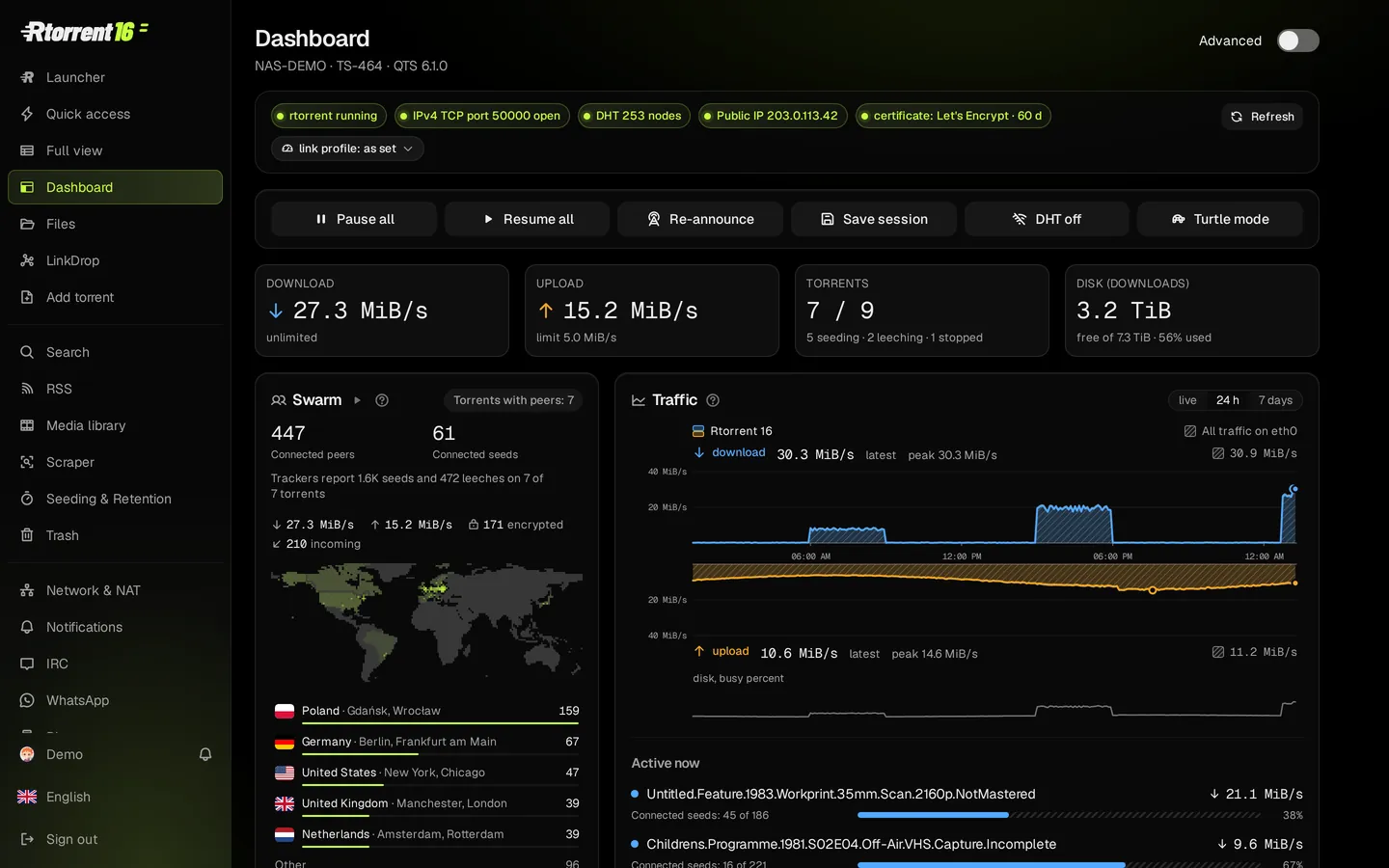
What it looks like
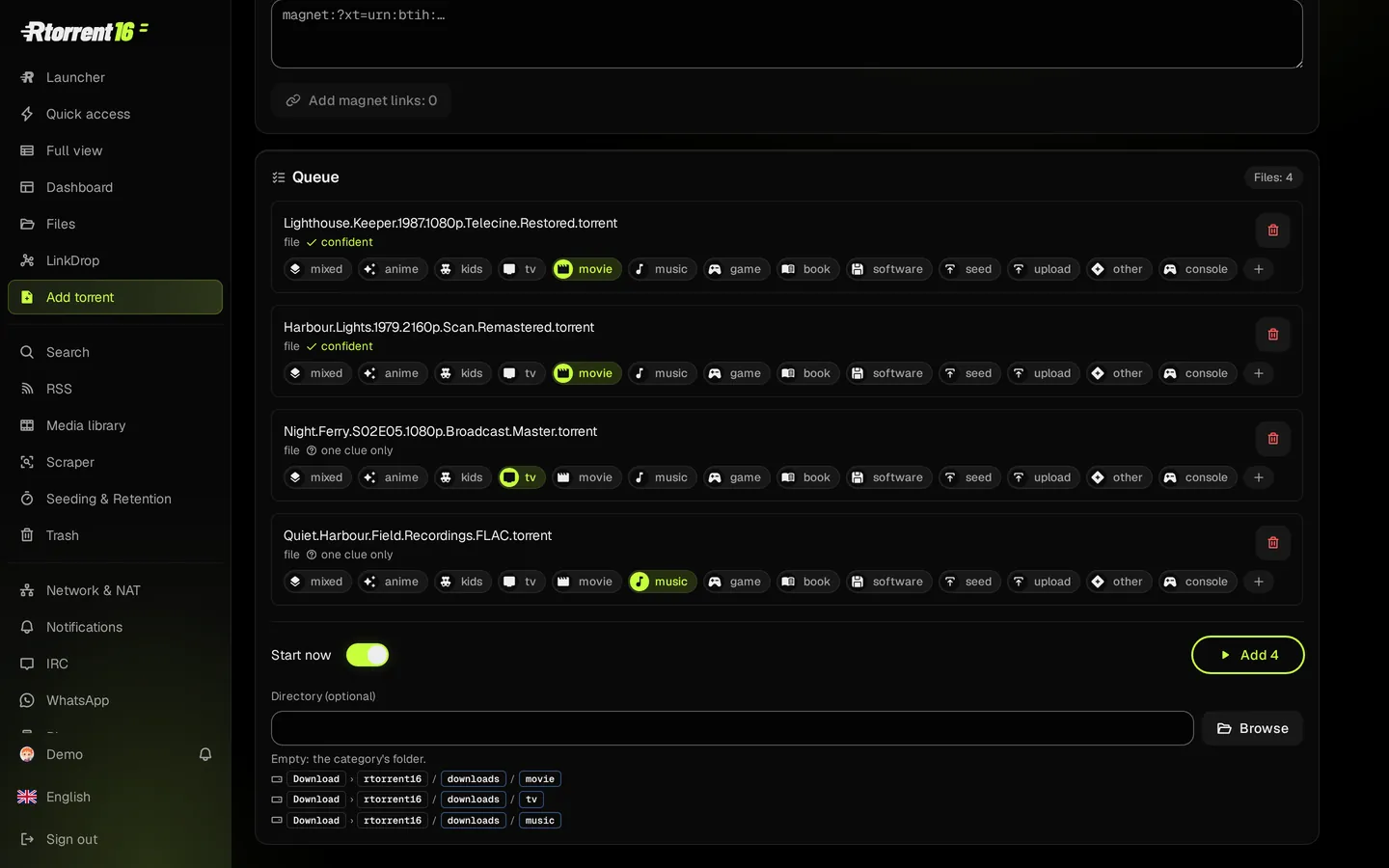
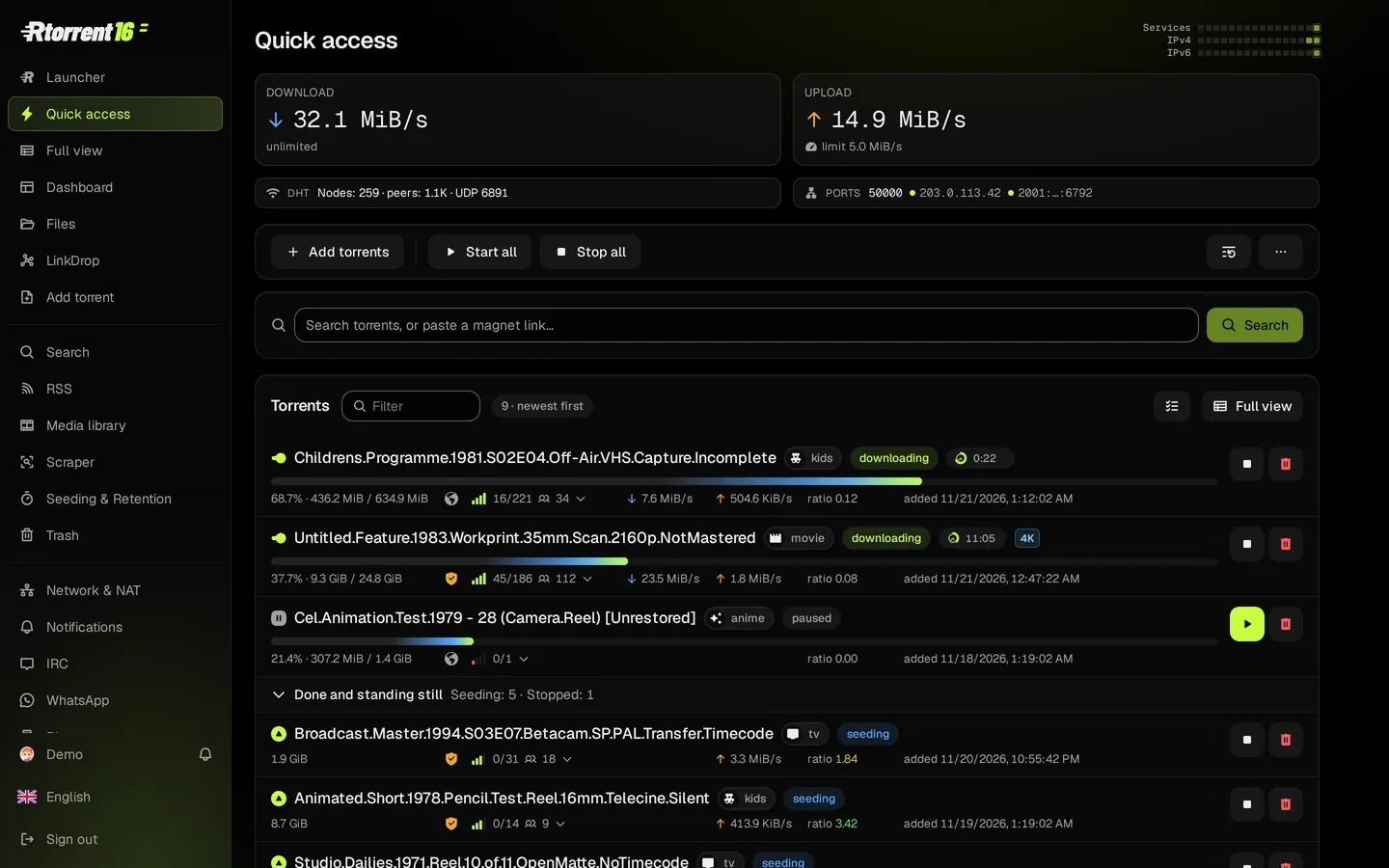
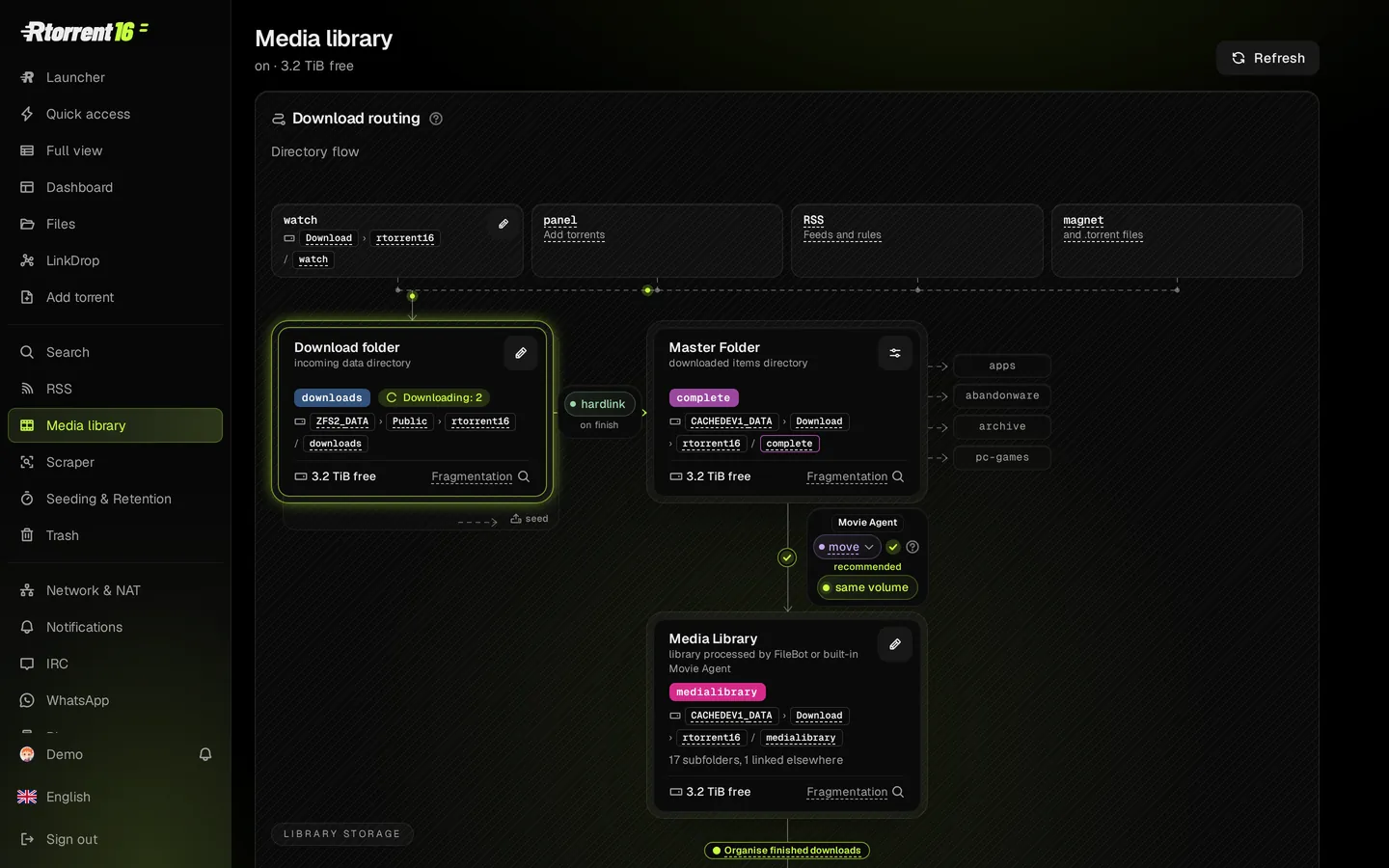
This is what the folders look like after a few downloads (made-up names):
downloads/
├── movie/     Sample.Film.2024.1080p/
└── tv/        Sample.Series.S01.1080p/
medialibrary/
├── Movies/    Sample Film (2024)/
└── TV Shows/ Sample Series/Season 01/A few numbers
- 40 seconds instead of 4 minutes. That's how much of your time one torrent takes when you drop it into a watch folder on the NAS, compared with about 4 minutes by hand on a PC. For a hundred torrents, it's about an hour instead of 7. These are estimates from the Rtorrent 16 docs, and they favour the PC.
- volume, wolumin
A part of a pool, or of a RAID, with a filesystem, where shared folders are.No second copy. On the volume where your downloads are, the library uses hard links. A film in the library takes no extra space, and the torrent keeps seeding. - 9 languages. The panel speaks English, Polish, German, French, Italian, Dutch, Swedish, Japanese and Traditional Chinese.

Three steps
1 Install it and leave the defaults
Install it and leave it exactly as it comes, with the default settings.
- App Center
The app store of QTS and QuTS hero.In App Center, add the NASutils repository and install Rtorrent 16 from it. - Open the panel on port 6019. When you first sign in, go through the short welcome guide or press Not now.
The first time it starts, Rtorrent 16 creates its base folder with downloads/, complete/ and watch/ inside.
2 Add downloads with a category
Then you add your downloads, either by dropping them into the watch folder or through the panel.
- Panel: in Quick access, press Add torrents and paste a magnet link or pick a
.torrentfile. - Watch folder: make a folder per category under
watch/once, such aswatch/movie/andwatch/tv/. A file you drop intowatch/movie/gets the categorymovie.
There's only one thing you have to take care of: give each download a category when you add it. It matters because it costs you next to nothing, and in return your downloads come out sorted. This is the most important move in all of Rtorrent. Stick to it, and your torrent downloads will never be a junk-filled mess again.
In the panel, that move is often just a glance. The panel guesses the category from the torrent's name and picks it for you. If it guesses wrong, you click another one. The category decides which folder it goes to: a film gets its own folder under downloads/movie/, a series under downloads/tv/.
3 Point Plex at the library
There's one switch to flip, because the library is off by default. Open Media library, turn on Organise finished downloads into a media library and press Review & save.
Then add Plex, Kodi, Jellyfin or Emby by pointing it at the library folders for films and series: films are in medialibrary/Movies/, series in medialibrary/TV Shows/. Movie Agent, which comes with the package, gives every film and episode a name Plex recognises and files it in the library.

Before you ask
Rtorrent is server software. Will I have to live at the command line?
No. You install Rtorrent 16 from App Center and run it from a panel in your browser. When you first sign in, the panel offers a guide that takes about 5 minutes. You can skip it and come back to it later.
Why not a plain torrent client?
A client that's only a torrent client stops when the download finishes. Moving the file, naming it for Plex and keeping the folders tidy are then up to you. Rtorrent 16 handles those steps itself, from the category to the library.
Do I need a container?
An isolated place where one or more processes run on the NAS's own kernel. Its image holds the application and what it needs.
No. You install Rtorrent 16 from App Center like any other app, without a container.
I download through a VPN. Does that work?
An encrypted connection that joins a device to another network.
Yes. The welcome guide asks whether your traffic goes through a VPN and shows the steps for your setup: a port your VPN provider assigns, or a VPN on your router.
I see the same files in downloads/, complete/ and the library. Do they take up space more than once?
Not if everything is on one volume. Then complete/ and the library use hard links: the data is stored only once on the disk, and the torrent keeps seeding from downloads/. If you put the library on another volume, Rtorrent 16 makes a copy there.
Will it run on my QNAP?
Rtorrent 16 needs QTS 6.0 or QuTS hero 6.0 or later, on an Intel, AMD or 64-bit ARM processor. It's free, and you get updates in App Center.
There are so many settings. Do I have to go through them all?
No. Rtorrent has plenty of settings, and you can look at them some other time. What you just set up is really all you needed to configure.
That's exactly why I called this article “Best Torrent Client for QNAP”.
Try it with one download
Install Rtorrent 16, add one torrent with a category and open your downloads folder. You'll see where it landed.
- Rtorrent 16: everything the panel does →
- Install from App Center →
- Click through the demo → The demo is the panel with made-up data.